
how-to-improve-time-to-hire
How To Improve Time To Hire: 12 Proven Agency Strategies
Every day a role stays open costs your agency money, credibility, and sometimes the candidate altogether. Clients expect speed. Candidates lose interest. And your competitors are one submission ahead....
Written by: Saply Team
How To Improve Time To Hire: 12 Proven Agency Strategies
Every day a role stays open costs your agency money, credibility, and sometimes the candidate altogether. Clients expect speed. Candidates lose interest. And your competitors are one submission ahead. If you’ve been searching for how to improve time to hire, you already know that shaving even a few days off your recruitment cycle can be the difference between placing a candidate and losing them.
The problem isn’t usually sourcing. Most agencies have decent pipelines. The bottleneck lives in the middle of the process, the formatting, tailoring, matching, and back-and-forth that eats hours before a single CV reaches a client’s desk. That’s exactly the kind of operational drag that turns a 20-day hire into a 35-day one, and it’s where the biggest gains are hiding.
This article breaks down 12 strategies that staffing agencies are using right now to cut their time to hire, from smarter screening workflows to automating CV formatting and tailoring with tools like Saply. Each strategy is practical and agency-specific, not generic HR advice recycled from a corporate playbook. Whether you manage a team of five recruiters or fifty, you’ll walk away with a clear action plan to move candidates from pipeline to placement faster.
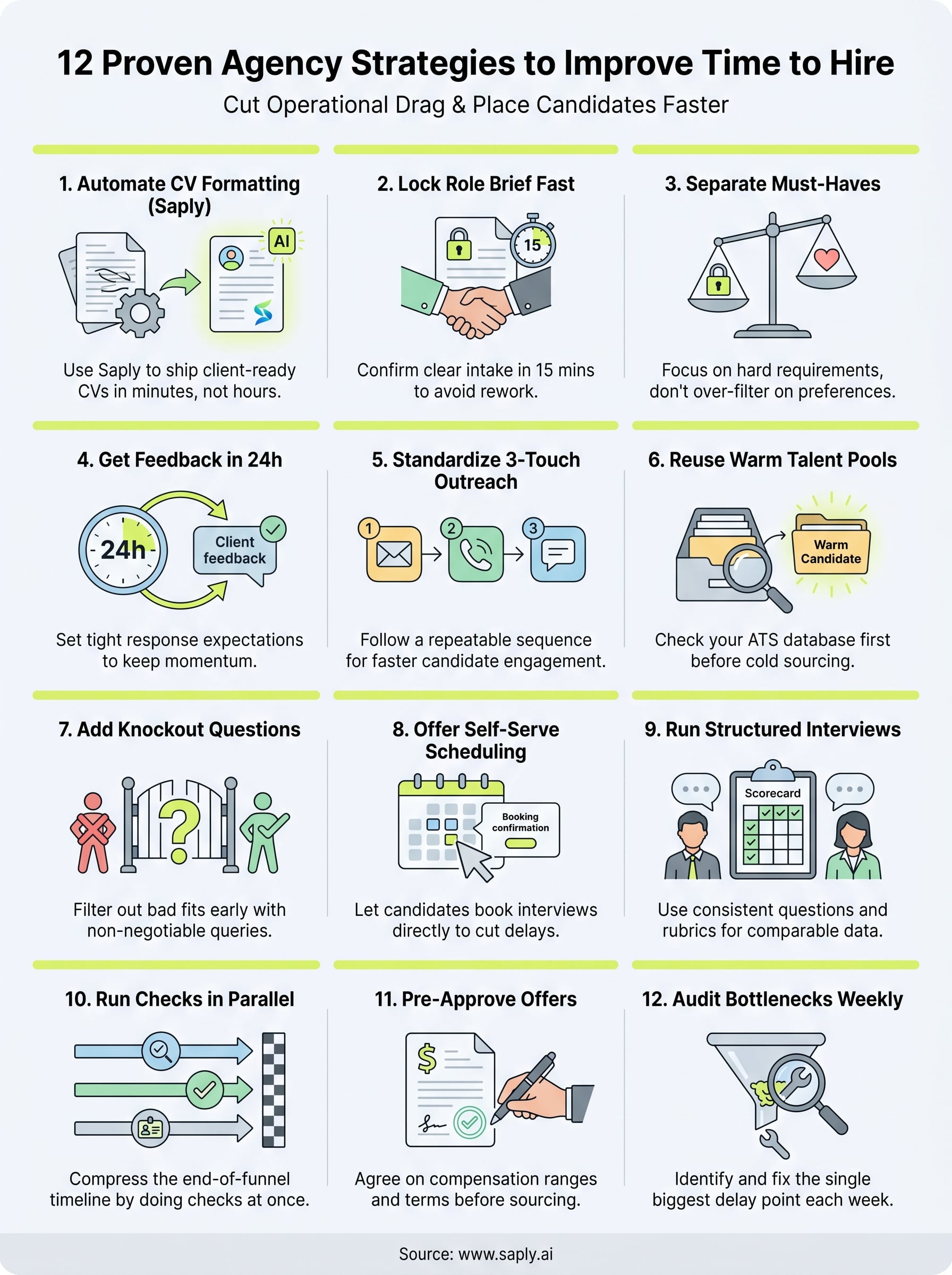
1. Use Saply to ship client-ready CVs fast
CV formatting and tailoring is one of the most time-consuming manual tasks in any agency’s workflow. Before a recruiter pitches a candidate, they’re often spending 30 to 60 minutes copy-pasting content, fixing layouts, and adjusting language to match a job description. Saply removes that bottleneck entirely by automating formatting and tailoring inside the tools your team already uses every day.
What it fixes in your time-to-hire workflow
If you’re serious about how to improve time to hire, start by measuring how long it actually takes to prepare a CV for submission. For most agencies, that number is higher than they expect. Saply applies your agency’s CV template in one click and tailors the content to the specific job description, whether that’s pulled from your ATS or entered manually. The result is a client-ready CV in minutes, not an hour.
Cutting CV preparation time by even 30 minutes per submission adds up fast when a recruiter handles 10 to 20 roles at once.
How to implement it across Word, Google Docs, and Outlook
Saply runs as a plugin inside Microsoft Word, Google Docs, and Outlook, so your team doesn’t need to open a separate platform or change how they work. Start by uploading your templates during onboarding (Saply integrates custom templates within 48 hours). From there, recruiters open a raw CV, click to apply the template, and use the AI tailoring feature to align the content with the job description.
You can also connect Saply directly to your ATS (Bullhorn, Carerix, or Spott) so job descriptions pull in automatically. This eliminates copy-pasting entirely and keeps your submission workflow inside familiar tools. The 14-day free trial lets your team test the full setup before committing to a billing cycle.
KPIs to track to prove impact
Tracking the right numbers lets you confirm that automation is actually working. Focus on these metrics once you roll out Saply:
- CV preparation time per submission (baseline it before you start, then compare weekly)
- Submissions per recruiter per day (should increase as formatting time drops)
- Time from candidate intake to first client submission (target under 24 hours)
- Client shortlist rate (better-tailored CVs should improve how often clients respond positively)
Mistakes to avoid when you automate CV work
The most common mistake is treating automation as a reason to skip human review entirely. Saply handles formatting and tailoring, but a recruiter still needs to verify that the final CV accurately reflects the candidate’s background. Submitting an AI-tailored CV without a quick read-through can lead to inaccuracies that damage client trust.
Equally problematic is failing to standardize your template library before you start. If your agency uses five different CV formats across consultants, automation just scales the inconsistency. Lock in one or two approved templates first, then let Saply apply them consistently across every submission.
2. Lock the role brief in 15 minutes
A vague role brief is one of the most common hidden causes of a slow hire. When the job requirements aren’t clear from the start, recruiters source the wrong candidates, clients reject shortlists, and everyone wastes a week going back and forth. Locking the brief in the first conversation is one of the fastest practical ways to improve time to hire across your entire pipeline before you’ve sourced a single candidate.
What it fixes in your time-to-hire workflow
An unclear brief forces recruiters to guess what the client actually wants, which leads to misaligned submissions and wasted sourcing effort. Fixing this at the intake stage means your team spends time on the right candidates from day one rather than correcting course after the first wave of rejections. Every hour saved at intake multiplies downstream across sourcing, screening, and CV submission.
A 15-minute intake call backed by a structured template eliminates more rework than any other single intervention in the hiring process.
How to implement it with a single intake template
Build a one-page intake form that captures six core fields: job title, location and remote policy, salary band, top three required skills, preferred start date, and the client’s decision timeline. Send the form before the call, use it as a live document during the conversation, and confirm it in writing immediately after. Keeping the template consistent across your team means any recruiter can pick up a role without needing a separate briefing session.

KPIs to track to prove impact
- Brief-to-first-submission time: how long it takes from intake call to first candidate sent
- Shortlist acceptance rate by role: a rising rate signals better brief alignment with the client
- Number of brief revisions per role: target zero changes after the initial call
Mistakes to avoid during intake and handoff
The biggest mistake is treating the intake call as optional or letting it run without a fixed agenda. Skipping written confirmation of the agreed brief means details shift between the call and the first sourcing session. Also avoid handing a role to a different recruiter mid-search without transferring the full intake document, because context loss at handoff restarts the alignment process and adds unnecessary days to your cycle.
3. Separate must-haves from nice-to-haves
When every item on a job description carries equal weight, recruiters burn time screening out candidates who lack a “preferred” skill the client would happily overlook for the right person. Splitting requirements into two clear categories is one of the most direct ways to improve time to hire because it focuses your team on candidates who can actually move forward.
What it fixes in your time-to-hire workflow
Most agencies receive job descriptions written by hiring managers who treat every bullet point as a hard requirement. In practice, clients will compromise on several of those criteria when they see a strong candidate in front of them. Without a clear split, your recruiters over-filter the pool and surface fewer options than the client actually has. Fixing this at the brief stage means more candidates make it to the shortlist on the first round, cutting the feedback cycles that drag out your timeline.
Agencies that define must-haves upfront reduce shortlist rejection rates by eliminating the gap between recruiter judgment and client expectations before sourcing starts.
How to implement it with a calibrated scorecard
Build a simple two-column scorecard during the intake call: one column for hard requirements (specific certification, legal right to work, years of direct experience) and one for preferred attributes (industry background, tool familiarity, soft skills). Share the scorecard with the client and get written confirmation before sourcing begins. When a recruiter screens a candidate, they score against the must-have column first, and any candidate who clears it moves forward regardless of how many nice-to-haves they lack.
KPIs to track to prove impact
- Screen-to-shortlist conversion rate: a rising rate signals your requirements split is accurate
- Client rejection reasons per role: track how often rejections cite must-have gaps versus nice-to-have gaps
- Sourcing hours per placement: should drop as over-filtering decreases
Mistakes to avoid that create endless “purple squirrel” searches
The most damaging mistake is letting clients redefine must-haves mid-search without updating the scorecard. When criteria shift after sourcing starts, your team chases a moving target and previous submissions lose relevance. Also avoid treating experience thresholds as automatic disqualifiers; a candidate with four years of experience shouldn’t auto-reject when the brief says five unless that number is genuinely fixed and confirmed by the client.
4. Get client feedback within 24 hours
Waiting three to five days for a client to review a shortlist is one of the most preventable delays in any agency pipeline. When feedback stalls, candidates accept other offers, your team loses momentum, and the role stretches past its deadline. If you want to understand how to improve time to hire, tightening client feedback loops is one of the highest-leverage changes you can make with no additional sourcing required.
What it fixes in your time-to-hire workflow
Slow feedback creates a cascading delay effect across every stage that follows it. Your recruiters can’t refine the shortlist, candidates sit in limbo and disengage, and your competitors move faster. By committing clients to a 24-hour feedback window, you remove the most common single-point bottleneck between submission and interview scheduling.
Setting a response expectation at the start of the engagement is far easier than chasing clients for feedback after submissions land.
How to implement it with a tight submission and feedback loop
Send every shortlist with a pre-filled feedback form that asks clients to rate each candidate on two or three criteria rather than write open-ended responses. Shorter forms get completed faster. Pair this with a standard confirmation message at the point of kickoff that states your agency’s 24-hour feedback expectation clearly. If you don’t receive a response by the deadline, send one follow-up that afternoon, not the next morning.
KPIs to track to prove impact
- Average client feedback time per submission (measure from submission timestamp to first response)
- Candidate drop-off rate during shortlist review (tracks how many candidates withdraw while waiting)
- Interview scheduling lag (days from shortlist approval to first interview booked)
Mistakes to avoid that stall shortlists
The most common mistake is submitting candidates without a clear ask, such as “please review when you get a chance.” Vague language invites vague timelines. Equally damaging is sending large batches of candidates at once; clients delay reviewing ten profiles far longer than they delay reviewing three strong ones.
5. Standardize a 3-touch candidate outreach
Chasing candidates across five different channels with no clear sequence wastes time and produces inconsistent response rates. A standardized 3-touch outreach sequence gives your recruiters a repeatable system that connects with candidates faster and reduces the gap between first contact and confirmed interest. If you’re looking at how to improve time to hire, faster candidate engagement is one of the clearest levers you can pull.
What it fixes in your time-to-hire workflow
Unstructured outreach creates two problems: recruiters over-contact warm candidates and under-contact cold ones, both of which slow your pipeline. A fixed 3-touch sequence eliminates guesswork and ensures every candidate gets a consistent, well-timed approach that maximizes response before you move on and source elsewhere.
A predictable sequence also protects recruiter time: once a candidate doesn’t respond after three touches, you stop and redirect effort without second-guessing the decision.
How to implement it with channel mix and message sequencing
Build your sequence around three touches across 72 hours: a LinkedIn message or email on day one, a follow-up email on day two with a brief summary of the role, and a short phone call on day three. Keep each message under 100 words. The goal is a clear ask in each touchpoint, not a full job description dump. Use your ATS to log each contact so no recruiter doubles up or skips steps mid-sequence.

KPIs to track to prove impact
- Response rate per touch (identifies which channel and message type performs best)
- Average time from first outreach to candidate confirmation (measures sequence efficiency)
- Outreach-to-screen conversion rate (tracks quality of candidates who respond)
Mistakes to avoid that reduce reply rates
The most common mistake is sending the same message across all three channels with no variation. Candidates recognize copy-paste outreach and ignore it. Also avoid spacing your touches too far apart; a 48 to 72-hour window keeps the role top of mind without crossing into aggressive territory.
6. Reuse warm talent pools before you source
Before you post a new role or start a fresh sourcing campaign, check who is already in your database. Warm candidates who have been screened, interviewed, or placed before represent hours of qualification work that most agencies leave sitting unused. Tapping these contacts first cuts your sourcing cycle significantly and is one of the most overlooked ways to improve time to hire without adding budget or headcount.
What it fixes in your time-to-hire workflow
Cold sourcing takes days. Re-engaging a warm candidate who already knows your agency takes hours. When you build the habit of running an ATS search before opening a job board, you eliminate the earliest and most time-consuming phase of the recruitment cycle from a large share of your roles.
Agencies that consistently tag and segment their ATS contacts report filling repeat role types in half the time compared to sourcing from scratch.
How to implement it with ATS rediscovery and tagging discipline
The key is consistent tagging at the point of candidate entry so your searches return relevant results quickly. Build a tag taxonomy that covers role type, skill set, location, and availability window. Every time a candidate is screened or placed, the recruiter updates those tags before closing the record. When a new role opens, run a filtered ATS search first and only move to external sourcing if that search returns fewer than five qualified contacts.
KPIs to track to prove impact
Track these numbers once your tagging system is active:
- Talent pool fill rate: percentage of roles filled from existing contacts versus new sourcing
- Time to first submission for repeat role types: should drop as tagging improves
- ATS reactivation rate: tracks how often warm candidates respond and progress after re-engagement
Mistakes to avoid that waste sourcing hours
The most common mistake is skipping the ATS check entirely because the database feels outdated. Tags go stale when recruiters skip updates after each candidate interaction. Make record updates a required step every time a recruiter contacts or screens a candidate, and your pool stays accurate enough to rely on consistently.
7. Add knockout questions to stop bad fits
Screening unqualified candidates drains recruiter time faster than almost any other part of the process. Adding two to four knockout questions at the application or initial outreach stage filters out candidates who don’t meet non-negotiable requirements before a single call gets booked. If you’re thinking about how to improve time to hire, this is one of the simplest structural changes you can make with an immediate payoff.
What it fixes in your time-to-hire workflow
Every recruiter call with a candidate who turns out to be ineligible represents 15 to 30 minutes of lost time that compounds across a full shortlist. Knockout questions catch those candidates at the entry point, so your team only speaks with people who clear the basic requirements. Fewer wasted screens mean faster shortlists and a shorter gap between role brief and client submission.
Moving disqualification earlier in the funnel is one of the highest-return changes you can make without adding any new tools or headcount.
How to implement it in applications and recruiter screens
Build your knockout questions around the confirmed must-haves from your intake form: legal right to work, specific licenses or certifications, location constraints, and minimum experience thresholds. Add these questions to your application form in your ATS or send them as a short pre-screen message before booking a call. Keep the list to three questions maximum so candidates complete them and your team can process responses quickly without a scoring system.
KPIs to track to prove impact
- Screen-to-qualified rate: the percentage of screened candidates who meet all must-haves
- Average screens per placement: a dropping number confirms better pre-qualification
- Time from role open to first qualified submission: tracks whether early filtering speeds up your pipeline
Mistakes to avoid that screen out good candidates
The most common error is writing knockout questions that are too broad or subjective, which disqualifies strong candidates on criteria the client would actually overlook. Tie every question directly to a confirmed must-have, and review your question list any time a client revises the role brief. Avoid asking about nice-to-have skills at this stage; save those for the structured interview.
8. Offer self-serve scheduling and interview blocks
Coordinating interviews through back-and-forth emails is one of the most avoidable time sinks in the recruitment process. When candidates and clients each wait on the other to propose times, a single interview can take two to three days just to schedule. Giving candidates a self-serve booking link and pre-blocking your clients’ calendars in advance removes that lag entirely and keeps your pipeline moving without recruiter intervention.
What it fixes in your time-to-hire workflow
Manual scheduling creates unnecessary friction at the point where candidates are most engaged and most likely to drop off for a competing offer. If you want to understand how to improve time to hire, eliminating the scheduling back-and-forth is one of the fastest wins available. Self-serve tools push the booking decision to the candidate immediately, which cuts the gap between shortlist approval and confirmed interview from days to hours.
The faster a candidate books an interview, the less time they have to accept another offer while they wait.
How to implement it with calendar rules and interview windows
Start by setting pre-approved interview blocks with your hiring clients at the start of each search, typically two or three windows per week reserved specifically for candidate interviews. Then attach a booking link to every shortlist submission so candidates can self-select a slot without waiting for a recruiter to mediate. Keep each window 60 minutes or less so clients commit without pushback, and build in a 15-minute buffer between slots to handle overruns.

KPIs to track to prove impact
- Average time from shortlist approval to first interview booked (target under 24 hours)
- Scheduling confirmation rate within the same day (measures how quickly candidates self-book)
- Interview no-show rate (self-scheduled candidates tend to show up at higher rates than manually arranged ones)
Mistakes to avoid that cause no-shows and reschedules
The most common mistake is offering too many booking options, which causes candidates to delay choosing. Limit each link to your confirmed client windows only. Also avoid sending booking links without a clear deadline; candidates who don’t book within 48 hours rarely convert, so set an explicit expiration on each link.
9. Run structured interviews with a scorecard
Unstructured interviews slow your process in two ways: they produce inconsistent candidate assessments, and they force hiring teams to re-interview when different interviewers can’t agree on what they actually learned. A structured interview with a fixed scorecard eliminates both problems by standardizing how candidates are evaluated before anyone walks into the room.
What it fixes in your time-to-hire workflow
When interviewers ask different questions and score candidates in their heads, post-interview feedback becomes a debate rather than a decision. That debate adds days to your cycle while hiring teams align on criteria they should have agreed on before sourcing began. If you’re thinking about how to improve time to hire, structured interviews turn subjective impressions into comparable, decision-ready data that moves clients from “we need to discuss” to “let’s move forward” in a single debrief.
Standardized scoring cuts the time between final interview and offer decision by removing the subjective back-and-forth that typically follows unstructured formats.
How to implement it with consistent questions and rubrics
Build a four to six question interview guide for each role type that maps directly to your must-have criteria. Pair each question with a simple three-point rubric: below expectation, meets expectation, exceeds expectation. Share the guide with every interviewer before the first session and collect completed scorecards within two hours of each interview. Keep the scoring criteria anchored to observable behaviors, not gut feel, so different interviewers produce results that can be compared directly.
KPIs to track to prove impact
- Interviewer alignment rate: percentage of roles where all interviewers score the top candidate within one point of each other
- Time from final interview to offer decision: should drop as scorecard data replaces debate
- Offer acceptance rate: structured processes reduce the chance a candidate is pushed through despite clear red flags
Mistakes to avoid that create indecision and bias
The most common mistake is building a scorecard but skipping interviewer calibration. If each interviewer applies the rubric differently, the scores are meaningless. Run a 15-minute calibration session at the start of each search where the team agrees on what “meets expectation” looks like for each question. Also avoid adding new evaluation criteria mid-search; shifting the scorecard after interviews have started makes earlier scores incomparable and forces unnecessary re-evaluation.
10. Run checks in parallel, not in sequence
Most agencies run reference checks, background screenings, and right-to-work verification one after another, treating each step as a gate that blocks the next. That sequential approach adds five to ten business days to a process that can run simultaneously with almost no added risk. If you’re working on how to improve time to hire, shifting these steps to run in parallel is one of the fastest structural changes you can make to your final-stage process.
What it fixes in your time-to-hire workflow
Sequential checks create artificial waiting periods that candidates experience as silence. While your team waits for a reference to respond before starting a background screen, the candidate is fielding other offers and losing confidence in the process. Running every verification step at once compresses your end-of-funnel timeline from weeks to days and keeps candidates engaged through to offer.
Candidates who wait more than a week between final interview and offer acceptance are significantly more likely to withdraw or accept a competing role.
How to implement it with conditional steps and early consent
Start by collecting signed candidate consent for all required checks at the point of the final interview confirmation, not after the interview ends. This removes the consent lag entirely. Then trigger all verification streams on the same day using separate assignees or automated reminders in your ATS. Use conditional offer language with clients so the offer goes out immediately after interview, with checks completing in parallel rather than delaying the offer itself.
KPIs to track to prove impact
- Average days from final interview to offer sent: should drop once checks run simultaneously
- Check completion rate within five business days: measures how reliably your parallel process closes on time
- Candidate withdrawal rate during the offer stage: a falling number confirms the faster process retains more placements
Mistakes to avoid with compliance and candidate experience
The most common mistake is triggering parallel checks without confirmed client approval for conditional offers, which creates legal exposure if a check fails after a firm offer is extended. Confirm your client’s position on conditional offers at intake. Also avoid skipping a clear candidate communication about what checks are running and when they will complete; candidates who understand the process stay patient, while those left in the dark disengage.
11. Pre-approve offers and speed up sign-off
Waiting for internal approval on a compensation package after a candidate clears the final interview is one of the most avoidable delays in any placement cycle. When salary bands and offer terms are agreed in advance, your team can move from verbal acceptance to written offer within hours rather than days.
What it fixes in your time-to-hire workflow
Delayed sign-off creates a window where candidates reconsider, accept competing offers, or lose confidence in the process entirely. If you’re working through how to improve time to hire, locking offer parameters before the search begins eliminates the approval chain that typically stalls your final stage. Every day between verbal acceptance and written offer is a day the candidate can walk.
Recruiters who send offers within 24 hours of final interview acceptance report significantly lower candidate withdrawal rates than those who wait for internal sign-off.
How to implement it with comp ranges and offer templates
Agree on the full compensation range and contract terms with your client during the intake call, not after you’ve found the candidate. Build a one-page offer template that covers salary band, start date, contract type, and any standard conditions so your team fills in the confirmed numbers and sends immediately. Store pre-approved templates by client and role type in your document system so any recruiter can generate a compliant offer without waiting for a manager to draft one from scratch.
KPIs to track to prove impact
- Time from verbal acceptance to written offer sent (target under 24 hours)
- Offer approval cycle time (measures how long internal sign-off takes per client)
- Offer acceptance rate (a rising rate signals faster offers and fewer drop-offs)
Mistakes to avoid that trigger renegotiation loops
The most common mistake is presenting candidates at the top of the approved range without room to negotiate, which forces a second approval round the moment a candidate pushes back. Confirm the full band at intake and keep one or two points of flexibility built into the template so minor adjustments close on the spot rather than reopening the client approval process.
12. Audit bottlenecks weekly and fix one
Implementing individual process improvements only works if you track where time is actually being lost across your full recruitment funnel. Without a regular audit habit, delays accumulate invisibly and your team keeps addressing symptoms rather than root causes.
What it fixes in your time-to-hire workflow
Most agencies trying to understand how to improve time to hire focus on one stage and ignore the rest. A weekly bottleneck review gives you a complete view of where candidates stall, where clients slow things down, and where internal handoffs add unnecessary days. Fixing one specific issue per week produces compounding improvement across your entire cycle without overwhelming your team with simultaneous changes.
Consistent small fixes outperform large one-time overhauls because they allow your team to adapt and measure the impact of each change clearly.
How to implement it with a simple funnel dashboard and SLA targets
Build a basic funnel dashboard inside your ATS or a shared spreadsheet that tracks average time spent at each stage: sourcing, screening, submission, feedback, interview, offer, and placement. Assign an SLA target to each stage, such as 24 hours for client feedback or 48 hours for CV preparation and submission. Each week, identify the single stage with the largest gap between your actual time and your SLA target, assign one action to close that gap, and review the result the following week.

KPIs to track to prove impact
- Stage-by-stage average time across your active roles (updated weekly)
- SLA breach rate per stage: percentage of roles where a stage exceeds its target
- Week-over-week time-to-hire trend: confirms whether your fixes are moving the overall number
Mistakes to avoid that hide the real bottleneck
The most common mistake is averaging your data across all roles rather than segmenting by role type or client. A single complex search can distort your numbers and make a genuine bottleneck invisible. Track each role type separately so your weekly audit surfaces patterns rather than outliers.
Next steps
The 12 strategies in this article give you a complete picture of how to improve time to hire across every stage of your recruitment process, from the intake call to the final offer. No single tactic moves the needle on its own, but when you stack them together, the cumulative effect compounds quickly across your entire pipeline.
Start with the stages that are costing you the most time right now. Run the weekly audit first so you know exactly where your biggest delays live, then work through each strategy in the order that matches your agency’s current gaps. Every improvement you make frees up recruiter hours that go directly back into placements.
If CV formatting and tailoring is slowing your submissions down, try Saply free for 14 days and see how much time your team gets back before you commit to anything.