
plain-text-resume-format
Plain Text Resume Format: Essential for ATS Success in 2026
plain-text-resume-format
Written by:
plain-text-resume-format
So, what exactly is a plain text resume format? In simple terms, it's a bare-bones version of a resume, saved as a .txt file. It's completely stripped of any fancy design—no columns, no special fonts, no colors, and no graphics. Its one and only job is to be perfectly readable by Applicant Tracking Systems (ATS), which often choke on visually complex PDF or Word documents.
Why a Plain Text Resume Is Your Unsung Hero

Let’s be honest. In the world of high-volume recruiting, a beautifully designed resume that a machine can’t understand is just digital garbage. Getting comfortable with the plain text resume isn't just a "nice-to-have" skill anymore; it's a fundamental part of making sure your best candidates actually get noticed.
Put yourself in your own shoes for a moment. You're swamped with hundreds of applications for one open role. Every minute you waste trying to open a corrupted file or manually fix a garbled resume is a minute you aren't spending finding the right person for your client.
The Hard Truth About ATS Gatekeepers
Applicant Tracking Systems are the gatekeepers of the corporate world. It's not an exaggeration to say that 99% of Fortune 500 companies rely on them to manage the flood of applications. When a resume format is incompatible, it creates a black hole where great candidates simply disappear.
The result? A staggering 75% of resumes get filtered out by these systems for formatting issues alone, never even making it to a human's screen. Your ability to get candidates past this digital bouncer directly impacts your placement speed and, ultimately, your reputation.
This isn't really a candidate problem—it's an operational one. If you can ensure every resume you handle is 'algorithm-friendly,' you give every qualified person a fair chance and make your own life a whole lot easier.
To understand why this happens, it helps to see exactly how an ATS "sees" a resume. A visually formatted document is a minefield of potential errors, while a plain text version is a clean, easy-to-read map.
Visual Resume vs. Plain Text Resume for ATS
Resume Element | Visual Resume (Risks) | Plain Text Resume (Benefits) |
|---|---|---|
Contact Info in Header | Often ignored or misread by parsers, leading to lost contact details. | Placed in the main body, ensuring it's captured correctly every time. |
Columns & Tables | The ATS reads left-to-right, jumbling text from multiple columns into nonsense. | A single-column layout provides a linear, logical flow that parsers love. |
Custom Fonts & Graphics | Unrecognized characters appear as gibberish (e.g., "???"), hiding key info. | Uses standard, universally recognized fonts (like Arial, Times New Roman). |
Fancy Bullet Points | Custom symbols (→, ✓, ♦) can be misinterpreted or dropped entirely. | Simple characters (*, -) are universally understood and preserved. |
The takeaway is simple: what looks good to the human eye often looks like chaos to a machine.
From Recruiter Headaches to Smooth Workflows
Picture this all-too-common scenario: you're on a tight deadline for a priority role. You've sourced a dozen promising people, but half their resumes are a mess in your system. Contact information is scrambled, the work history is a jumble of dates and titles, and the keywords you need are nowhere to be found.
Now you're stuck doing manual data entry, a task about as exciting as the old days of copy-pasting resumes into the Europass format. This isn’t just a minor hassle; it's a bottleneck that grinds your entire pipeline to a halt.
Adopting a standard plain text resume format is the fix. It creates a clean, predictable stream of data that guarantees every resume you touch will:
Parse Correctly: Every section, from contact info to work experience, is read and sorted accurately by your ATS.
Showcase Keywords: With no visual noise, the system can instantly spot the skills and qualifications that matter.
Speed Up Screening: You can push candidates through your workflow faster, which directly improves your submission-to-interview metrics.
By making this one simple change, you stop being a document janitor and start operating like the strategic talent partner you are.
The True Cost of Ignoring Resume Formatting
We’ve all been there. You're on a tight deadline for a high-priority client, and the perfect candidate's resume lands in your inbox. But when you open it, it's a jumbled mess of symbols and broken text. That sinking feeling isn't just frustration—it's the sound of your agency's productivity taking a direct hit.
Every minute spent manually reformatting a PDF, correcting scrambled data from your ATS, or chasing a candidate for a different file type is a minute you're not closing a deal. These small, daily headaches add up, and they're quietly sabotaging your most important KPIs, from placement rates to your submission-to-interview ratio.
The Numbers Don't Lie
This isn't just an occasional annoyance; it's a massive, systemic problem. The stats are frankly shocking: an estimated 75% of resumes are discarded by an Applicant Tracking System (ATS) because of formatting errors alone. They never even make it to a human.
Think about that. If a single job ad pulls in 250 applications, you could be losing almost 200 of them to a simple formatting glitch. You can dig into more resume statistics to see just how deep this rabbit hole goes.
Even for the resumes that get through, you only have a tiny window. Most recruiters spend a mere 6-8 seconds on an initial scan. In that timeframe, there is zero room for error. A confusing layout or unreadable text means an instant "no," and you've wasted both your time and the candidate's.
The most straightforward way to end this operational nightmare is by standardizing on a plain text resume format. It stops the problem at the source, ensuring every resume is clean, parsable, and ready to go from the moment you receive it.
This simple shift changes your workflow from a constant state of reaction to one of proactive efficiency.
Turning Wasted Time into Real Gains
Let's get specific about what poor formatting is costing you and what you gain by fixing it.
Wasted Hours: Every time someone on your team has to manually re-key data from a garbled resume, that's time they aren't sourcing new talent or talking to clients. It's a pure administrative cost that multiplies across your entire team.
Lost Candidates: The best candidates are off the market fast. They don't have time to troubleshoot your system or resubmit their resume in three different formats. An unreadable file often means losing a perfect fit to a competitor with a smoother process.
A Damaged Reputation: Your reputation is built on delivering quality candidates, quickly. When formatting bottlenecks slow you down, it makes your agency look inefficient to both the clients who are waiting and the candidates you're trying to attract.
Adopting a plain text resume standard immediately gives you those hours back. You'll find yourself submitting candidates faster, improving your submission-to-interview ratio, and ultimately, closing more placements. This isn't just about having cleaner data—it's about building a more profitable and reputable recruitment agency.
Let's walk through exactly how to turn a fancy, formatted resume into a clean, parser-friendly plain text file. It’s a simple process, but you have to do it the right way. If you just "Save as .txt" from a Word doc, you'll end up with a mess of hidden code that can trip up an ATS just as badly as the original file.
The secret is to strip everything out from the very beginning. Open the original resume, whether it's a PDF or a .docx, and select all the text (Ctrl+A or Cmd+A). Now, copy it.
Don't paste it back into a word processor. Instead, open a completely basic text editor. We're talking Notepad on Windows or TextEdit on a Mac. If you're on a Mac, make sure you go to the "Format" menu and select "Make Plain Text." This simple copy-and-paste action is the most important step—it instantly removes all the invisible formatting, tables, and columns that cause parsing errors.
Rebuilding the Structure From Scratch
What you're looking at now is a wall of text. It’s ugly, but it’s clean. This is your foundation. From here, we're going to add back just enough structure for both software and humans to read it perfectly.
The first thing an ATS looks for are section headings. You need to make these crystal clear. Forget creative titles like "My Story" or "Where I've Been." Stick to the universally recognized standards.
Use all caps for your main headings: WORK EXPERIENCE, EDUCATION, SKILLS.
This creates an obvious visual break for a human reader skimming the document.
More importantly, it provides a clear, unmistakable signpost for the parsing software to categorize the information that follows.
Taming Bullets and Special Characters
Next up are your bullet points. The fancy arrows (→), checkmarks (✓), or custom images you used in your original design will either vanish or turn into gibberish characters like "•" in a plain text file.
The fix is easy. Just replace them with a standard character from your keyboard.
An asterisk (*) is the most common choice.
A hyphen (-) also works perfectly well.
Some people even use a plus sign (+).
Pick one symbol and stick with it for the entire document. A line that once looked like "→ Drove project completion 20% ahead of schedule" now becomes a clean and readable "* Drove project completion 20% ahead of schedule."
When resumes are full of these kinds of formatting errors, they create a massive time-suck for recruiters who have to manually clean up the data. It's a direct hit to productivity and your budget.
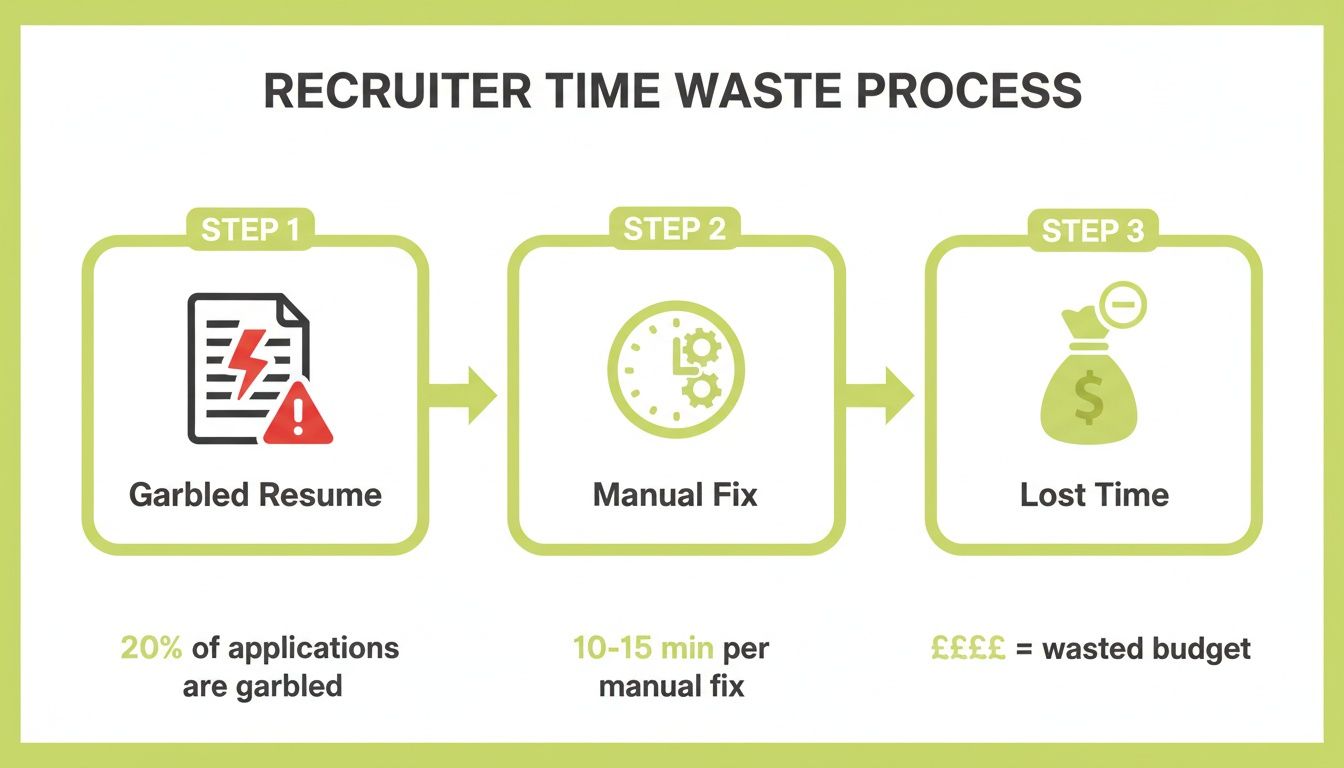
As you can see, what starts as a garbled resume quickly becomes a workflow bottleneck, something a clean plain text file avoids entirely.
Finalizing for Flawless Readability
With your headings and bullet points sorted, the last touch is adding some clear visual separation between the major sections of the resume. A simple line of keyboard characters does the job beautifully. You can use a row of equals signs (=====), hyphens (-----), or tildes (~~~~~). This helps break up the text for human eyes and reinforces the structure for the ATS.
Think of it like this: you're not painting a picture anymore. You're building with LEGOs. Each piece of information—a job title, a company name, a bullet point—is a simple, uniform block. You're just stacking them in a logical order that any person or machine can instantly understand.
Let's look at a quick before-and-after of a single job entry.
Before (in a Word Doc with a table):
Senior Project Manager | Tech Solutions Inc. |
|---|---|
Jan 2020 – Present | San Francisco, CA |
Led a cross-functional team of 12... |
After (in Plain Text):
SENIOR PROJECT MANAGER
Tech Solutions Inc. | San Francisco, CA
Jan 2020 - Present
Led a cross-functional team of 12...
Increased project efficiency by 25%...
See how everything is now linear? The two-column table is gone, and the information flows from top to bottom. That's exactly what you're aiming for. If you're often pulling resume info from websites or LinkedIn profiles, a URL to Markdown converter can be a handy shortcut for stripping out web formatting.
One last check: make sure the candidate's contact information is right at the top of the file, not stuck in a header or footer. Each piece of info (name, email, phone) should be on its own line. Getting this routine down will make a huge difference in your data quality and recruiting speed. For more ideas on improving your entire hiring workflow, check out these recruitment process best practices.
The Recruiter's Secret Weapon: Beating the Bots and Winning Over Humans
Every recruiter knows the two-front war a resume has to win. First, it has to get past the AI gatekeeper. Then, it has to survive the six-second scan from a human who’s seen it all and is getting harder to impress. This is where a clean, plain text resume format becomes your most powerful, and perhaps most overlooked, tool.
When you strip a resume down to its raw text, you're not dumbing it down; you're making a strategic choice. By removing columns, fancy fonts, and graphics, you force the AI to see only what matters: skills, keywords, and measurable results.
At the same time, you hand the human reviewer a document that feels refreshingly direct and authentic. It’s clean, it’s honest, and it gets straight to the point. You’re not trying to dazzle with design—you're proving value with substance.
The AI Hiring Paradox
We're in a strange place with hiring technology. On one hand, automation is essential. By 2026, 91% of employers are expected to use AI for resume screening, and a staggering 94% agree that these tools help them find qualified candidates more efficiently. It's a numbers game, and AI helps manage the volume.
But there's a catch. That same efficiency has made recruiters wary of generic, bot-written applications. A recent study found that 62% of employers now automatically reject resumes that feel too templated or AI-generated. You can dig deeper into this trend in this excellent analysis of 2026 resume trends.
This creates a paradox: your candidate’s resume must be simple enough for a machine to parse, yet compelling enough for a human to believe.
The goal is to create a resume that not only gets a green light from the AI but also survives the human "sniff test" for authenticity. It needs to read like it was written by a person, for a person.
This means we have to coach candidates to stop just listing job duties and start articulating their real impact.
Making Achievements Pop in a Simple Format
The best thing about a plain text resume is that it has nowhere to hide. The content has to do all the work, which is exactly what you want. Here’s how to guide your candidates to make their accomplishments stand out, even in the simplest format.
Insist on Quantifiable Results: "Managed social media" is a task. "* Grew social media engagement by 45% over six months" is an achievement. Numbers are the great equalizer—they are easily parsed by software and highly valued by hiring managers.
Focus on Powerful Action Verbs: Encourage strong, specific verbs that signal real contribution. Words like "Accelerated," "Negotiated," "Launched," or "Resolved" carry far more weight than passive phrases and are prime keywords for screening software.
Tell a "Problem-Action-Result" Story: Each bullet point should be a miniature case study. What was the problem? What action did the candidate take? What was the positive result? This narrative structure provides the authentic context that makes a candidate memorable.
When you combine powerful, outcome-driven language with a spartan format, you get a document that’s perfectly optimized for technology but speaks directly to human reviewers.
Automating Your Workflow Beyond Plain Text
Getting your resumes into a plain text format isn't just a defensive move to beat the ATS. It's actually the first, most critical step toward seriously automating your entire workflow. Think of it as creating a clean, reliable stream of data that can fuel more powerful recruitment tools and give you back hours of your day.
Your agency runs on candidate data. When resumes come in as a jumbled mess of PDFs and Word docs with weird formatting, it’s like trying to run a high-performance engine on dirty fuel. It just clogs everything up. By starting with a clean plain text version, every single process that follows—from parsing to matching—runs smoother and with far fewer errors.
This simple change moves you away from the grind of administrative busywork. Instead of fighting with file formats, you can focus on the high-value activities that actually lead to placements, like nurturing candidate relationships and strategizing with clients.
Bridging The Gap From Machine To Human
So, you have this perfectly formatted plain text resume. Now what? This is where it gets really interesting, because that file is the ideal input for sophisticated recruitment automation platforms. These tools are built to solve the core dilemma every recruiter faces: you need a resume that a machine can read perfectly and one that a human will find impressive.
Imagine a workflow that handles both sides of the coin for you:
Machine-Readable Input: A candidate sends you their resume, and you can instantly convert it into a clean plain text version. You know with 100% certainty it will sail through any ATS without a single parsing mistake.
Human-Ready Output: With a click, you use that clean data to generate a beautifully branded, client-ready resume. It can even include a compelling summary tailored to the specific role you're submitting them for.
This two-pronged approach gives you the best of both worlds. The plain text file ensures flawless data capture and screening, while the polished, branded version makes a professional impact on the hiring managers who make the final call.
Unlocking True Recruitment Automation
This kind of process fundamentally changes your day-to-day. All that time you once spent manually reformatting documents, correcting what the parser got wrong, and just wrestling with incompatible files is suddenly back in your hands. This is where tools built specifically for recruiters can make all the difference. For example, you can explore how Saply.ai turns this concept into reality, transforming messy CVs into polished submissions instantly.
This isn't just about saving a few minutes here and there. It's about eliminating an entire category of low-value work from your day, freeing you up to focus on what you do best—connecting great talent with great opportunities.
To take it even further, you can build efficiency into how you create text in the first place. If you're looking to move beyond manual typing for your notes and communications, it’s worth your time to master voice typing to boost productivity and speed up how you handle candidate information.
By embracing a plain text standard as your starting point, you lay the groundwork for a highly efficient, automated system. You ensure every candidate gets a fair shot, every client submission looks professional, and your entire team can operate at peak performance. It’s the key to moving faster and closing more deals.
Answering Your Questions About Plain Text Resumes
I get it. The idea of stripping a beautifully crafted resume down to its bare bones can feel a little counterintuitive. Even when you know it's the right move for getting past the ATS, some nagging questions usually pop up. Let's walk through the most common ones I hear from recruiters.
"Will a Plain Text Resume Make My Candidate Look Lazy?"
This is hands-down the biggest worry, and it’s a fair point. But it’s all about knowing your audience. The plain text version isn't for the hiring manager's eyes—at least not at first. It’s a tool built specifically for the machine.
Think of it as a two-step strategy. The plain text file is your secret key to unlock the ATS gate. Its only job is to get your candidate’s qualifications parsed perfectly. Once you're through that digital checkpoint and a human is involved, you follow up with the polished, client-branded resume that really shines.
"What are the Most Common Mistakes to Avoid?"
The single biggest mistake I see is assuming that "Save as .txt" in Microsoft Word is all you need to do. That's a trap. Doing this often leaves behind weird formatting artifacts and invisible code that can scramble the resume just as badly as a complex PDF. You have to manually clean it up.
A plain text resume isn't meant to win design awards; it's designed to win the attention of an ATS. Its stark simplicity is its greatest strength, ensuring every keyword and qualification is seen and understood without interference.
Beyond that initial misstep, here are a few other common errors that trip up the ATS:
Fancy Symbols: Recruiters forget to replace visual bullet points (like →, ◆, or ✓) with basic hyphens (-) or asterisks (*).
Tables and Columns: An ATS reads straight across from left to right. If you leave tables in, a perfectly organized two-column layout turns into a single line of jumbled nonsense.
"Creative" Section Titles: Stick to the classics. An ATS is programmed to look for standard headers like "Work Experience," "Education," and "Skills." A clever title like "Where I've Made an Impact" will likely just get ignored.
"Does This Mean Designed Resumes are Obsolete?"
Absolutely not! A professionally designed resume is still critical. You need it for direct emails to hiring managers, for in-person networking, and for showcasing a candidate's personal brand on their LinkedIn profile.
The key is understanding when to use each one. The plain text version gets you in the door. The designed version impresses the people inside the room. They’re two different tools for two very different parts of the job.
Ready to stop wasting time on manual reformatting and start submitting candidates faster? With Saply.ai, you can instantly transform any messy resume into a perfectly formatted, client-ready document with a single click. Our AI-powered tool lives inside your existing workflow, helping you create deal-winning submissions that stand out. Learn how Saply.ai can accelerate your placements today.