
whats-the-best-resume-format
What's the Best Resume Format for Recruiters in 2026
whats-the-best-resume-format
Written by:
whats-the-best-resume-format
There's no single “best” resume format. The right choice depends entirely on the candidate’s career story, but for most professionals with a steady work history, the Reverse-Chronological format is the undisputed king. It’s the language that both recruiters and Applicant Tracking Systems (ATS) speak fluently.
However, when you're working with career changers or candidates with noticeable employment gaps, a Skills-First/Hybrid format can be a much smarter play. It shifts the focus to what they can do rather than a timeline that might raise questions.
Choosing the Best Resume Format for Your Candidates
As a staffing pro, you know the pain of receiving a pile of mismatched, poorly formatted resumes. It’s an administrative nightmare that clogs up your workflow, weakens your client presentations, and can absolutely lose you a placement.
The challenge is a constant balancing act. You need a resume that sails through an Applicant Tracking System, but it also has to grab the attention of a human hiring manager. This is why knowing how to strategically choose a resume format is such a valuable skill. By standardizing the resumes you submit, you’re not just saving yourself hours of tedious reformatting; you’re building a stronger case for every single candidate.
Matching Candidates to the Right Format
So, how do you decide between a classic chronological history and a layout that puts skills front and center? It really just takes a quick look at the candidate's professional journey. Your goal is simple: pick the format that tells their story in the most convincing way possible.
This decision tree breaks it down visually, showing how to select a format based on career stability, gaps in employment, or a big industry pivot.
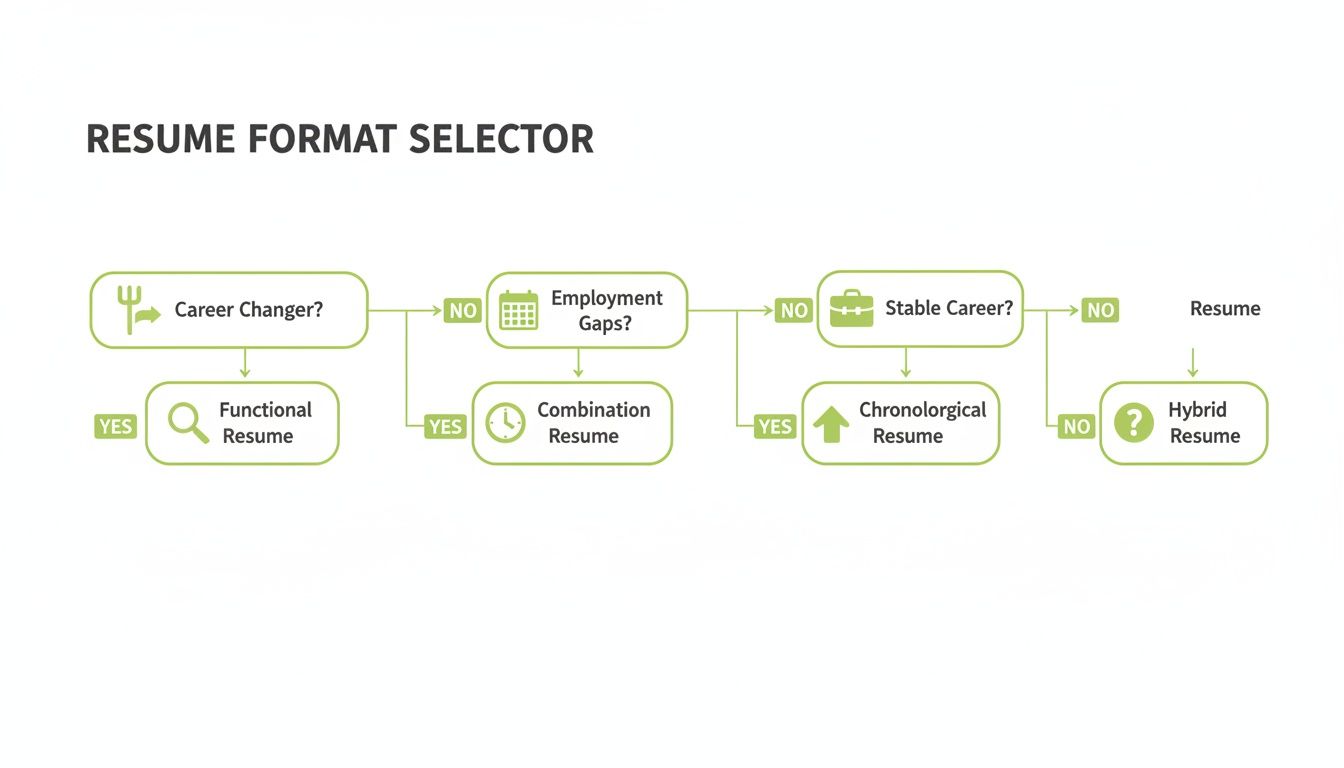
As you can see, a stable career path leads straight to the chronological format. But for those making a change or explaining a gap, a functional or hybrid format becomes the obvious strategic choice.
Thinking about every submission this way helps shift your mindset from just filling roles to actively selling your candidate's potential. If you want to dive deeper into this philosophy, check out our guide on why recruiting is sales and how framing your candidates’ profiles is key to closing more placements.
At-a-Glance Guide to Resume Format Selection
For a quick reference, here’s a high-level summary matching common candidate profiles to the most effective resume format.
Candidate Profile | Recommended Format | Primary Strategic Goal |
|---|---|---|
Stable Career Progression | Reverse-Chronological | Showcase clear growth and loyalty |
Career Changer | Skills-First / Hybrid | Highlight transferable skills |
Recent Graduate | Reverse-Chronological | Emphasize education and internships |
Employment Gaps | Functional or Hybrid | De-emphasize timeline, focus on ability |
Project-Based/Freelancer | Skills-First / Hybrid | Display a portfolio of relevant skills |
This simple framework can help you make a quick, strategic decision for every candidate, ensuring their best qualifications are always the star of the show.
Picking the Right Resume: A Look at the 3 Core Formats
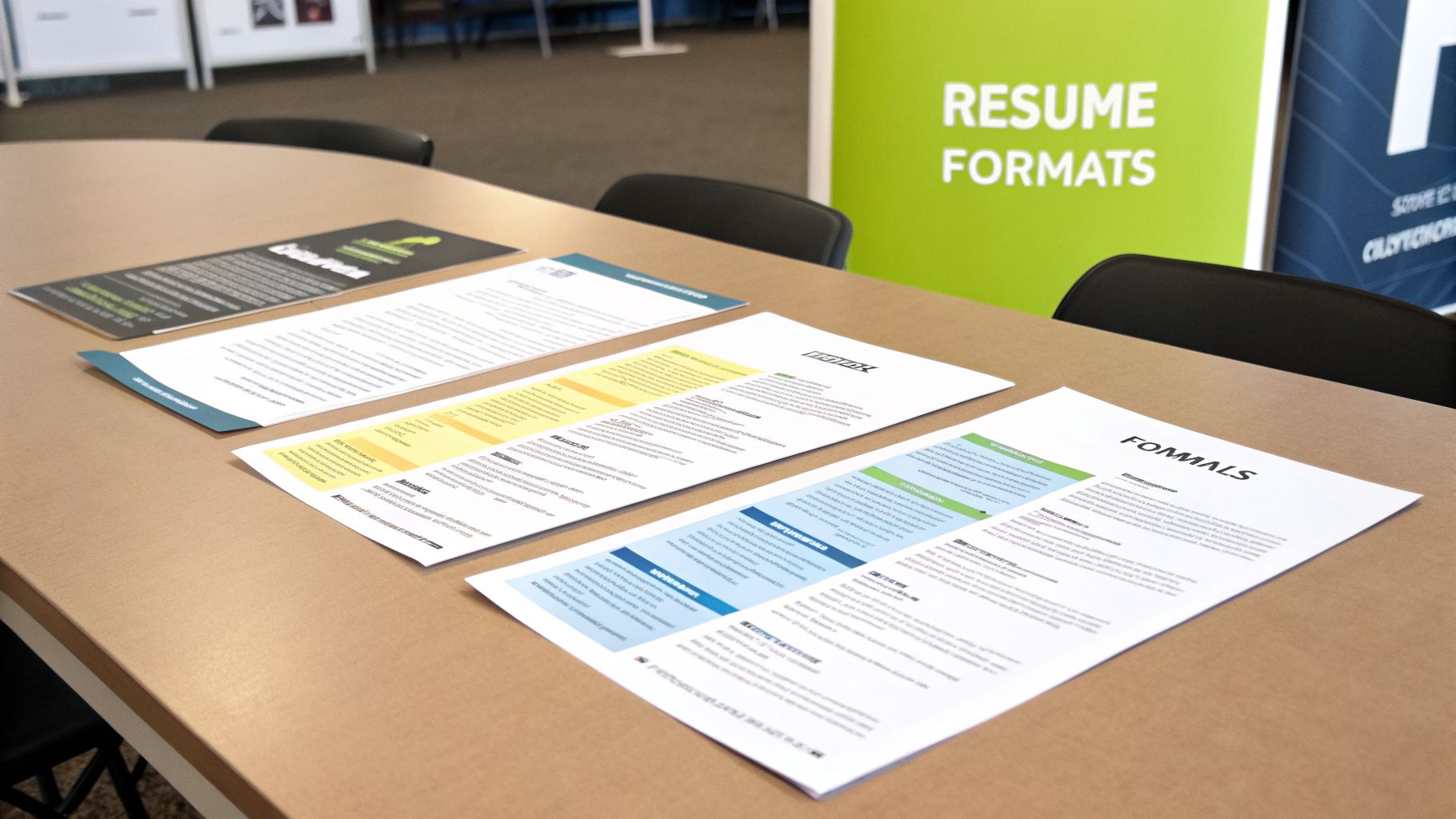
Before you write a single word, you have to choose your layout. This isn't just about looks; it's about strategy. Each of the three main resume formats tells a different story about your career. Picking the right one means framing your professional history in a way that makes the most sense for the job you want.
Let's dig into what they are and when to use them.
The Reverse-Chronological Format
This is the one everyone knows. The Reverse-Chronological format is the undisputed industry standard, and for good reason. It lists your work experience from your most recent job backward, creating a clear, easy-to-follow timeline of your career.
Hiring managers like this format because it quickly shows them your career progression and any growth in responsibilities. It’s the perfect choice for anyone with a steady work history in one field. Because it's so common, it’s also the most ATS-friendly format you can use; virtually every system can read it perfectly.
Who should use it? Professionals with a solid career path, no major employment gaps, and a clear story of growth. For most people, this is the safest and most effective bet.
The Functional Format
Now for something completely different. The Functional format pushes your work timeline to the background and puts your skills front and center. The main event here is a "Skills Summary" section right at the top, where you group your accomplishments under headings like "Client Relationship Management" or "Data Analysis."
Your actual work history gets demoted to a simple list at the bottom—often just company names, titles, and dates. This is a strategic move to draw attention away from a spotty or unconventional timeline. It can be a useful tool if you're changing careers, have long gaps between jobs, or have a diverse background that doesn't fit a neat, linear path.
Be warned, though: many recruiters see a purely functional resume as a red flag, suspecting you might be hiding something. It also tends to confuse Applicant Tracking Systems that are built to look for a chronological work history.
The Hybrid or Combination Format
This is where modern resumes are heading. The Hybrid format (or combination resume) pulls the best ideas from the other two. It gives you a way to highlight your key skills without burying your work history.
A hybrid resume usually kicks off with a powerful summary or skills section that showcases your most relevant abilities and wins. Right after that, you'll find your work experience laid out in reverse-chronological order. This one-two punch lets you immediately prove you have the right skills for the job while still giving recruiters the clear timeline they expect to see.
It’s an outstanding choice for:
Career changers who need to connect the dots between past experience and a new field.
Tech professionals where specific software or coding languages are more important than past job titles.
Anyone targeting a role where you need to prove specific skills right away.
For many, this format is the best answer to the question "what's the best resume format?" because it offers the perfect blend of focus and clarity.
Comparing Resume Formats For Recruiter Success
Choosing a resume format is more than a simple style choice—it's the first strategic decision you make for a candidate. Get it right, and you pave a smooth path through Applicant Tracking Systems (ATS) and into the hands of a hiring manager. Get it wrong, and a great candidate can be dead in the water before a human ever sees their name.
Each format tells a different story. To make sure your candidate’s story gets heard, you have to understand how each one holds up under the intense scrutiny of both software and the people behind it. Let's pit them against each other and see which comes out on top.
ATS Compatibility And Readability
Before any human reads a resume, the ATS has to parse it. This is the first and most unforgiving gatekeeper. If the software can't read the resume correctly, qualifications become irrelevant. This makes ATS compatibility the non-negotiable first test.
The reverse-chronological format is, without a doubt, the safest bet. Its straightforward, linear structure with predictable headings like "Work Experience" is exactly what these systems are built to understand. An ATS can easily pull dates, titles, and job duties, giving your candidate the best shot at a high match score.
On the other hand, the functional resume is a huge gamble. These formats are notorious for tripping up ATS parsers because they lack a clear, dated work history. The software struggles to connect the dots, which often leads to garbled data, missed keywords, and an unfair rejection.
The skills-first / hybrid format offers a smart, modern solution. It leads with a keyword-rich skills section but follows it up with a clean, reverse-chronological work history. This gives you the best of both worlds: it satisfies the ATS's need for a clear timeline while putting the candidate's most relevant qualifications front and center.
Key Takeaway: For guaranteed ATS clearance, stick with Reverse-Chronological. The Functional format is far too risky, while the Hybrid model provides a powerful and compatible alternative for the right candidate.
Impact On Hiring Manager Perception
Once a resume clears the ATS, it has mere seconds to make an impression on a human. This is where the format’s ability to communicate value quickly becomes critical.
The reverse-chronological format is still the gold standard for 80% of experienced hires, especially in traditional fields like finance and healthcare where a clear career trajectory is highly valued. Most recruiters I know find it works for the vast majority of their clients, easily outperforming creative layouts that just don't play well with ATS filters. Even with this classic, small tweaks matter—using standard headings like 'Professional Experience' ensures up to 98% compatibility with systems like Workday, as detailed in these recruiter-focused resume statistics.
The functional format, however, often sets off alarm bells. Hiring managers and recruiters immediately get skeptical, wondering if the candidate is hiding employment gaps or a history of job-hopping. It tries to highlight skills but can unintentionally signal an unstable career path.
This is where the skills-first/hybrid format is gaining so much ground, especially in fast-moving industries like tech and marketing. It gives hiring managers exactly what they're looking for right at the top: a quick confirmation that the candidate has the right skills. Once they're hooked, they can scan the work history for context.
Before we dive into specific recommendations, let's look at a side-by-side comparison of how these formats perform against the criteria that matter most to recruiters and hiring managers.
Resume Format Performance Matrix For Recruiters
This table breaks down how each format stacks up against key performance indicators, from passing the initial ATS scan to making a lasting impression on a hiring manager.
Performance Criterion | Reverse-Chronological | Functional | Skills-First / Hybrid |
|---|---|---|---|
ATS Compatibility | Excellent | Poor | Very Good |
Clarity of Career Path | Excellent | Poor | Good |
Highlights Key Skills | Good | Excellent | Excellent |
Hiring Manager Perception | Very Positive | Often Negative | Positive |
Hides Employment Gaps | Poor | Excellent | Good |
Best For Stable Careers | Yes | No | Yes |
Best For Career Changers | No | Yes | Yes |
As you can see, there's no single "best" format—the right choice is entirely dependent on the candidate's background and goals. The reverse-chronological resume is the reliable workhorse, while the hybrid format offers a powerful, strategic alternative for specific situations.
Effectiveness By Career Stage And Industry
The ideal format is never a one-size-fits-all decision. It has to be tailored to the candidate's experience level, career goals, and the industry they're targeting.
Here’s a quick guide for choosing the right one for your candidate:
Entry-Level Candidates: Stick with the reverse-chronological format. It provides a clear timeline to showcase internships, education, and part-time roles, which is exactly what hiring managers want to see.
Mid-Career Professionals: If they have a solid, upwardly mobile career path, reverse-chronological is the way to go. For those making a slight pivot or working in a skill-centric field, the hybrid format is a stronger choice.
Seasoned Executives: It's almost always reverse-chronological for executives. Their long, successful track record is their biggest selling point. A powerful executive summary at the top serves the same purpose as a skills section.
Career Changers: The hybrid or functional format is the most strategic move. It allows them to lead with transferable skills and reframe their narrative, proving their value before a manager can get hung up on a seemingly irrelevant work history.
Freelancers and Consultants: The hybrid format is perfect here. It lets them feature a diverse skill set from various projects right at the top while still providing the structured work history recruiters need to see.
In the end, your job is to analyze the candidate's journey and the expectations of their target audience. By carefully weighing ATS compatibility, recruiter perception, and the candidate’s specific career story, you can choose the format that gives them the best possible chance of success.
Why the Skills-First Format Is Gaining Momentum

While a traditional reverse-chronological resume shows where a candidate has been, the skills-first (or hybrid) format tells a much more important story for today’s roles: it’s about what they can do right now. This shift in focus is precisely why it’s becoming the format of choice in fast-moving, project-driven industries.
Think about fields like tech, marketing, and consulting. Specific abilities almost always matter more than the name of a past employer. A hiring manager for a software engineering role cares far more about a developer's fluency in Python and AWS than they do about a two-year job at a company that used a totally different tech stack. This format gets straight to the point by putting a candidate's most relevant skills front and center.
Honestly, this approach just makes a recruiter's job easier. Instead of digging through a work history to connect the dots, the most important information is right at the top. It allows for a quicker, more accurate match to the job description from the first glance.
Answering the Call for Skills-Based Hiring
The job market has been quietly undergoing a massive change. More and more, companies are prioritizing what people can actually do over traditional credentials like degrees or even years of experience. This push toward skills-based hiring is the real engine behind the hybrid format’s popularity.
And this isn't just a passing fad. By 2026, the skills-first approach has solidified its place, with 43% of businesses making skills-based hiring their number one talent strategy. It's a direct response to a major headache for recruiters—a staggering 70% say that accurately identifying a candidate's skills is their biggest daily challenge. In a world where Applicant Tracking Systems can reject up to 75% of resumes, the hybrid format's blend of a keyword-rich skills section and a clear work history gives it a serious edge. You can see more about these dominant resume trends for 2026 here.
Simply put, this format delivers exactly what both hiring managers and the ATS are scanning for.
By leading with a curated "Key Skills" or "Areas of Expertise" section, you immediately frame the candidate as a solution to the client's problem. This proactive positioning is far more powerful than a passive timeline of past jobs.
Real-World Scenarios Where This Format Excels
Let's move from theory to practice. Here are a few common scenarios where the skills-first format isn't just better—it's a game-changer. It gives you a strategic advantage by shaping the candidate's story to fit the role perfectly.
The Tech Professional: An AI developer's value is their mastery of frameworks like TensorFlow and languages like Python. A hybrid resume puts those mission-critical skills right at the top, guaranteeing they’re seen in the first five seconds.
The Project-Based Consultant: A management consultant who has worked for multiple firms on a wide range of projects can look scattered on a chronological resume. The hybrid format allows you to group their wins under skill-based headings like "Change Management" or "Process Optimization," which tells a much clearer and more compelling story.
The Digital Marketer: For a PPC Specialist, expertise with Google Ads and data analytics platforms is everything. Their resume should lead with these skills, immediately followed by tangible results (e.g., "Reduced cost-per-acquisition by 15%"). It’s instant proof of what they bring to the table.
In every one of these cases, the focus shifts from a simple work history to a powerful showcase of in-demand expertise. This doesn't just improve the quality of your candidate matches; it drastically cuts down the time you spend prepping submissions, helping you move faster and place more talent.
Automating Resume Formatting with Saply.ai
Knowing which resume format works best is one thing, but actually applying it is where the real work begins. For any busy recruiter, the hours spent manually reformatting inconsistent CVs each week is a serious drain on time—time that should be spent talking to candidates or closing placements. This is where automation can completely change the game.
Saply.ai was created to tackle this exact problem. It’s designed to help recruiters move away from tedious admin and focus on strategic, high-impact work. The goal is to take any messy, unformatted CV and turn it into a polished, client-ready document that matches your agency’s brand standards in minutes, not hours.
Best of all, it works right inside the tools you already use. Saply.ai integrates directly into Microsoft Word and Google Docs, so there’s no need to learn a whole new platform or sit through a complicated onboarding process.
From Disorganized CV to Client-Ready Submission
We’ve all been there. A fantastic candidate sends over their resume, but it’s a mess—disorganized, written in an unprofessional font, and it buries the key skills your client actually cares about. In the past, this meant a painful, manual copy-paste session.
With Saply.ai, that workflow is a thing of the past. You just upload the CV, and the platform’s AI gets to work, instantly applying the right format, standardizing the headings, and creating a clean layout that will get past both an ATS and a hiring manager.
But it does more than just make things look good. Saply.ai can also analyze the job description to:
Tailor content by finding and highlighting the most relevant skills and experience.
Generate a compelling summary that frames the candidate as the perfect solution for the role.
Ensure consistency across every single submission, reinforcing your agency’s reputation for quality.
This process turns what used to be an hour of frustrating work into a quick, two-minute task that directly boosts your chances of making a successful placement. If you've ever wrestled with clunky templates like Europass, you know the pain. You can read more about a better approach in our article here: https://www.saply.ai/blog/still-copy-pasting-into-europass-theres-a-better-way.
Standardizing Quality and Boosting Efficiency
One of the biggest wins with automation is its ability to create a consistent standard of excellence. When every recruiter on your team uses a tool like Saply.ai, every single resume you send to a client meets the same high bar.
This kind of consistency builds trust and reinforces your agency's reputation as a professional, detail-oriented partner. It guarantees that every candidate is presented in the best possible light, no matter how rough their original CV was.
The real power of resume automation isn’t just saving time—it’s about creating a repeatable process that elevates the quality of every single candidate submission, giving you a competitive edge in a crowded market.
For agencies that rely on tools like Saply.ai, the underlying technologies like automated resume parsing solutions are what make this kind of rapid and accurate reformatting possible.
The Practical Impact on Recruitment Workflows
By taking the manual burden of reformatting off your plate, Saply.ai frees up recruiters to focus on what actually drives revenue: building relationships and closing deals.
Let’s look at the tangible benefits:
Faster Submissions: Get perfectly formatted resumes to clients before your competitors even have a chance, increasing your shot at securing an interview.
Improved Placement Rates: By tailoring resumes to specific roles, you present candidates more effectively and directly improve your client-to-interview ratio.
Enhanced Team Productivity: Removing one of the most hated administrative tasks allows your team to manage more roles without feeling burnt out.
Strengthened Brand Identity: Every document that leaves your agency looks polished, professional, and on-brand.
In the end, choosing the best resume format is just the first step. Automating the implementation is what lets you execute that strategy perfectly every time, turning a great candidate profile into a winning submission.
Essential Resume Formatting Best Practices for Recruiters
No matter which resume layout you land on—chronological, functional, or skills-first—some rules are universal. These are the fundamentals that ensure every resume looks professional, sails through Applicant Tracking Systems (ATS), and is genuinely easy for a human to read. Nailing these details isn't just a nice-to-have; it's how you give your candidates their best shot.
It all starts with clean typography. Stick with a professional, ATS-friendly font like Calibri, Arial, or Aptos and don't deviate. For the body text, a font size between 10 to 12 points is the sweet spot for readability, while section headings can be bumped up to 12 to 14 points. To really give your candidates an edge, you need to understand how today's next-generation applicant tracking systems actually parse different layouts and fonts.
Creating a Clear Visual Structure
A well-organized resume does the heavy lifting for the reader, guiding their eyes to the most important information. Using standard one-inch margins is a simple trick that adds crucial white space, making the entire document feel less overwhelming and much quicker to scan.
Always use standard, predictable section headings like "Professional Experience" or "Education." This helps both the hiring manager and the ATS figure out where everything is. Getting creative with titles might seem clever, but it's a surefire way to confuse the software.
Key Takeaway: When in doubt, keep it simple. A clean, single-column layout is your best bet. It offers the highest guarantee of passing through an ATS without critical information getting mangled or lost.
Optimizing Content for Impact
Once the foundation is solid, it's time to make the content pop. This is where a simple list of job duties gets transformed into a powerful story of achievement.
Here’s what really moves the needle:
Use Powerful Action Verbs: Kick off every bullet point with a strong verb that shows initiative. Words like "Managed," "Implemented," or "Developed" instantly convey ownership.
Quantify Achievements: Numbers are your best friend. "Increased sales by 20%" tells a much more compelling story than a vague phrase like "Responsible for sales."
Integrate Keywords: Scour the job description for key terms and phrases, then weave them naturally throughout the resume. This is one of the single most effective ways to improve a candidate’s ATS ranking.
Think of these tips as your final quality check before a resume goes out the door. If you want to zoom out and see how this fits into the bigger picture, take a look at our complete guide on recruitment process best practices. By mastering these small but critical details, you ensure every candidate you represent looks sharp, professional, and ready for the role.
Common Questions About Resume Formats
Even seasoned recruiters run into tricky formatting questions. When you're trying to position a candidate perfectly, the little details matter. Here are some straightforward answers to the most common resume dilemmas.
How Should I Format a Resume for a Candidate with Employment Gaps?
When you’re dealing with a resume that has career gaps, your best bet is the Functional or Skills-First format. These formats are designed to draw attention away from a spotty timeline.
Instead of leading with a chronological work history, you put their most valuable skills and accomplishments front and center. This immediately shows the hiring manager what the candidate brings to the table, making any employment gaps far less noticeable.
Is It Better to Submit Resumes as PDF or Word Documents?
This is a classic debate, but for recruiters, the answer is simple: a Microsoft Word (DOCX) file is almost always the safer choice. PDFs are great for locking in formatting, but they can be a nightmare for Applicant Tracking Systems (ATS).
Many systems, especially older ones, just can't parse PDF files correctly. This can cause the ATS to scramble the candidate's information or reject the application outright. Unless a client specifically requests a PDF, stick with Word to ensure it gets through.
Pro Tip: Don't let a file type sink a great candidate. Some studies show that certain ATS platforms have a significantly higher rejection rate for PDFs. Submitting a DOCX file is a simple way to avoid that unnecessary risk.
When Is a Creative or Infographic Resume Appropriate?
Use creative resumes very, very sparingly. They really only work for a handful of roles, like graphic designers or brand strategists, where the resume itself can act as a mini-portfolio.
For nearly every other job—especially in corporate fields like tech, finance, or law—an infographic resume is a liability. It’s a guaranteed fail with any ATS and often comes across as unprofessional to hiring managers who just want to find key information quickly. The Reverse-Chronological or Skills-First format will always serve you better.
Stop wasting hours on manual resume reformatting. With Saply.ai, you can transform any messy CV into a client-ready, branded submission in minutes, right inside Microsoft Word. Discover how to automate your workflow and win more placements today.