
google-docs-resume-templates-download
8 Free Google Docs Resume Templates to Copy and Customize
A clean, well-structured resume gets noticed. A messy one gets skipped. The problem is that building a resume from scratch takes time most people don't have, which is exactly why Google Docs resume te...
Written by: Saply Team
8 Free Google Docs Resume Templates to Copy and Customize
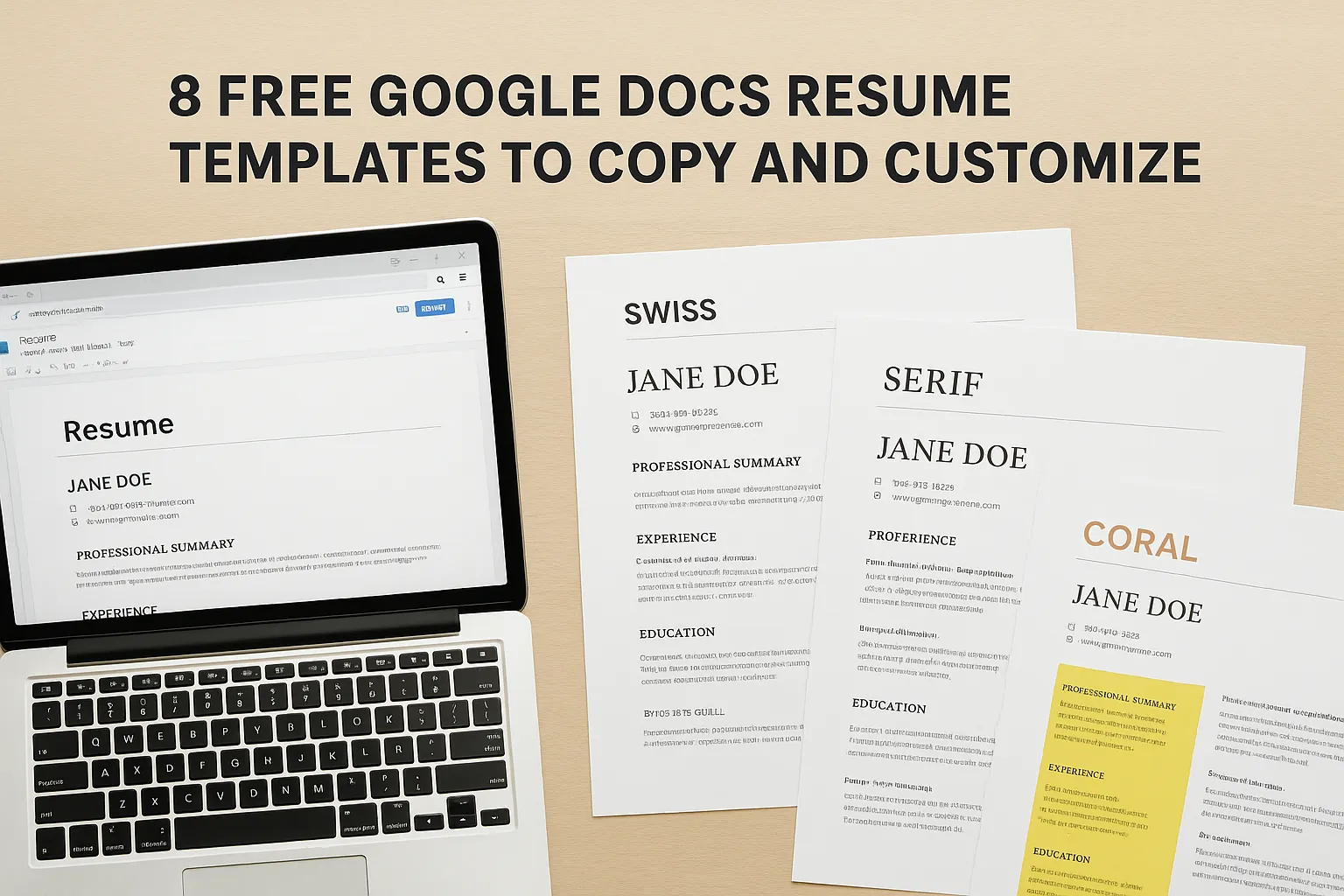
A clean, well-structured resume gets noticed. A messy one gets skipped. The problem is that building a resume from scratch takes time most people don’t have, which is exactly why Google Docs resume templates download searches are so popular. Google Docs gives you a free, browser-based editor with zero software to install, and the right template turns a blank page into a polished resume within minutes.
Not every template out there is worth your time, though. Some look outdated, others break apart the moment you start editing, and a few are structured so poorly they create more work than they save. At Saply, we use AI to format and tailor thousands of CVs for staffing agencies and recruiters, so we know exactly what separates a functional resume template from one that just looks nice in a preview.
We picked 8 free Google Docs resume templates you can copy, customize, and use right away. Each one is straightforward to edit, looks professional on screen and in print, and doesn’t require any design skills to make it your own. Below, you’ll find options for different experience levels and career stages, along with tips on what to look for when choosing the right fit.
1. Google Docs template gallery: Swiss
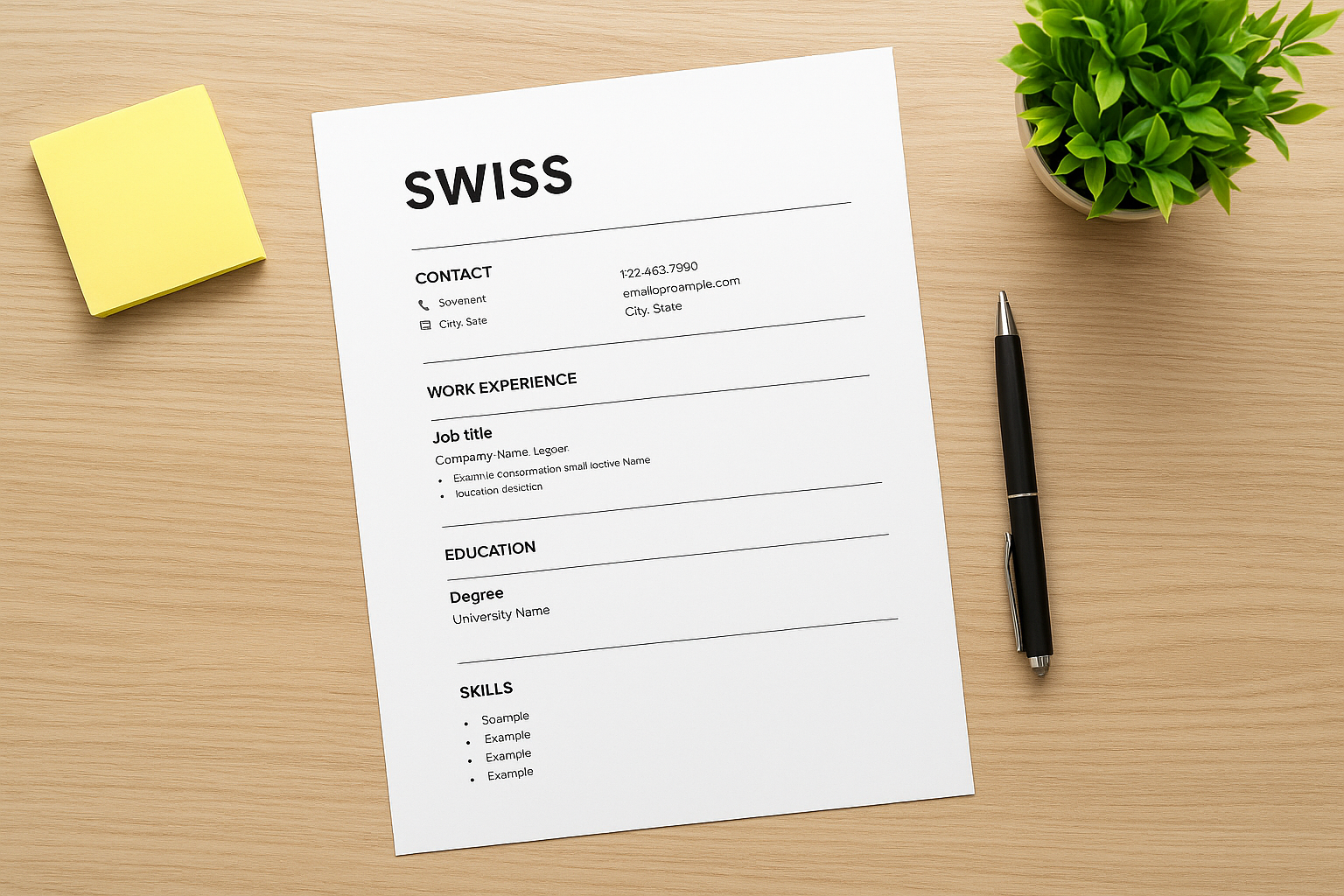
The Swiss template is one of the most popular built-in options in the Google Docs template gallery, and you can access it without any external google docs resume templates download required. Go to File > New > From template gallery directly inside Google Docs, and you’ll find it ready to copy in seconds. The design is minimal, structured, and easy to scan, which makes it a reliable starting point for job seekers across most industries and experience levels.
What it looks like at a glance
Swiss uses a clean, single-column layout with your name prominently displayed at the top in a large, bold font. Below that, contact details, work experience, education, and skills follow in clearly labeled sections separated by thin horizontal lines. The color palette stays black and white with no decorative elements, so the focus stays entirely on your content. Font choices are simple and readable, meaning the document looks sharp and professional without requiring any design work on your part. Every section is easy to locate at a glance, which matters when a recruiter spends only a few seconds scanning the page.
When this template works best
This template performs well when you’re applying to corporate, finance, legal, or traditional industries where a conservative, text-forward resume is expected over a designed one. It also holds up when submitting through companies that use applicant tracking systems, since the single-column, text-only structure is easy for ATS software to parse correctly without misreading your information. If you have a strong, consistent work history and want the content to carry the document on its own, Swiss steps aside and lets it do exactly that.
A single-column, text-based layout is one of the safest structural choices for ATS compatibility because it avoids tables, text boxes, and multi-column arrangements that can scramble parsed data before a human ever reads it.
Potential drawbacks to watch for
Swiss’s biggest limitation is that it looks identical to thousands of other resumes because it’s a Google default that any user can access for free. Hiring managers who review high volumes of applications will recognize the format immediately, which reduces the chance your resume stands out visually. You also get limited visual separation between sections, so if your career spans many roles or industries, the document can start to feel dense and hard to navigate without careful manual spacing and formatting adjustments on your end.
2. Google Docs template gallery: Serif
Serif is another built-in option available through the Google Docs template gallery, so no separate google docs resume templates download is needed. Like Swiss, you open it directly from File > New > From template gallery inside Google Docs. Where Swiss prioritizes pure minimalism, Serif brings a slightly warmer, more traditional feel while still keeping the layout clean and professional.
What it looks like at a glance
Serif uses a two-tone header that places your name and contact information at the top in a slightly larger, more stylized font than you’ll find in Swiss. The rest of the document follows a single-column structure with clear section labels for experience, education, and skills. The typography leans on a serif font throughout, which gives the page a polished, document-like quality that reads well in print.
When this template works best
This template suits roles in academia, law, writing, communications, or any field where traditional document formatting carries weight. If you’re applying to companies with a more formal culture, the serif typography signals that you take presentation seriously without overloading the page with design.
Serif fonts tend to perform well in printed form, which makes this template a strong choice if you expect your resume to be physically reviewed rather than viewed on screen.
Potential drawbacks to watch for
The serif font styling can look slightly dated in fast-moving industries like tech or startups, where sans-serif designs feel more current. You’ll also want to watch section spacing as you add content, since the layout compresses quickly and becomes harder to scan as the page fills up.
3. Google Docs template gallery: Spearmint
Spearmint is the most visually distinct option you’ll find in the built-in Google Docs template gallery, and like the others, it requires no separate google docs resume templates download to access. Open it through File > New > From template gallery and you’ll have a copy ready to edit in under a minute. It brings a light touch of color to an otherwise text-heavy document format, which sets it apart from Swiss and Serif right away.
What it looks like at a glance
Spearmint uses a soft green accent color applied to your name, section headers, and dividing lines throughout the page. The layout stays single-column, keeping the structure straightforward and easy to read. Your name and contact details sit prominently at the top, with experience, education, and skills sections following in a predictable order beneath. The color accent gives the document personality without overwhelming the content.
A single, consistent accent color can help your resume feel designed without requiring any graphic design experience to execute well.
When this template works best
This template works well for roles in creative, marketing, education, or nonprofit sectors where a small visual touch reads as intentional rather than unprofessional. If you want your resume to feel slightly more personal than a plain black-and-white layout, Spearmint delivers that without crossing into anything distracting.
Potential drawbacks to watch for
The green accent color may not match every industry’s expectations, particularly in finance or legal environments where conservative formatting is the norm. You’ll also want to verify ATS compatibility before submitting, since colored text and styled headers occasionally cause parsing issues depending on the system.
4. Google Docs template gallery: Coral
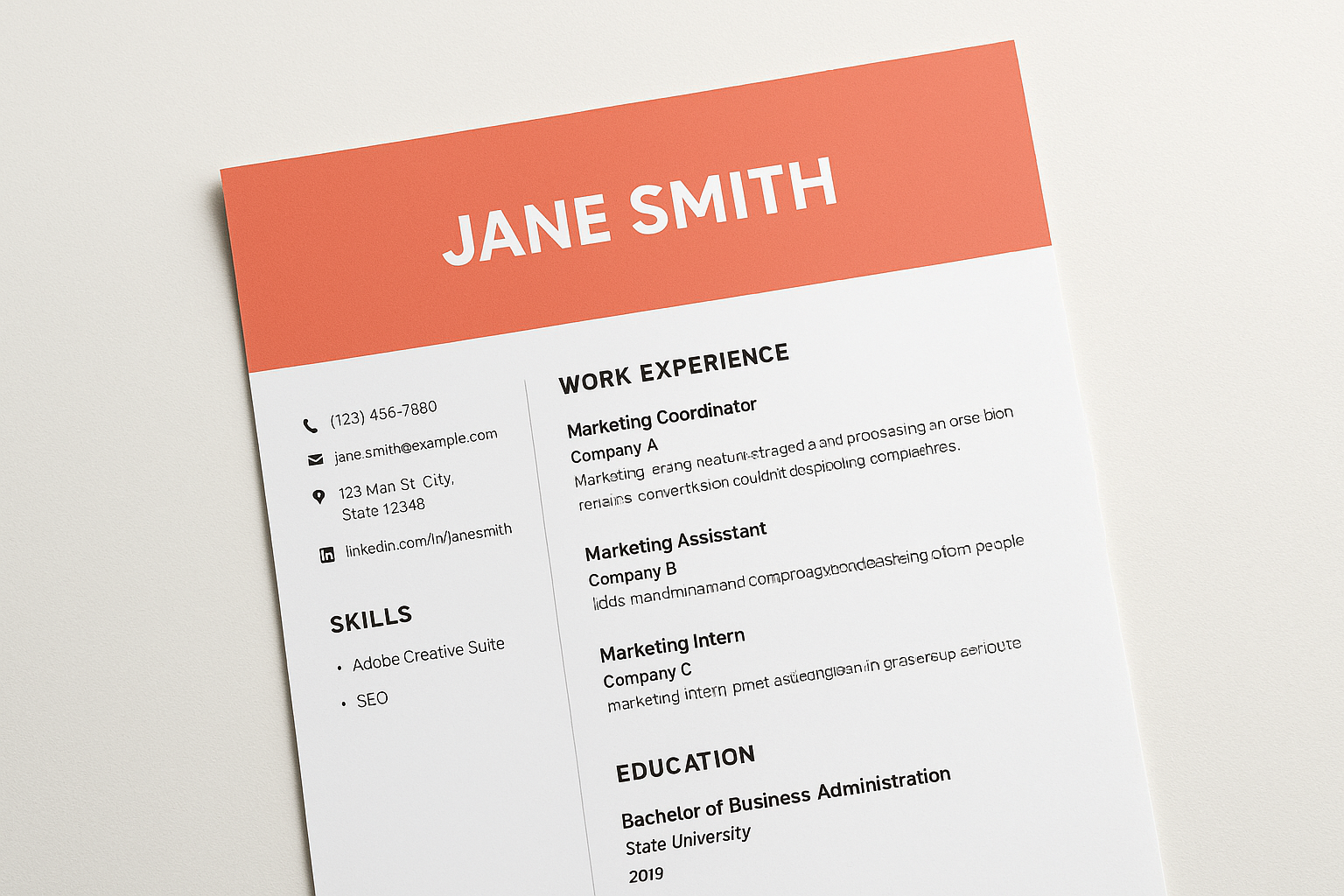
Coral is the most visually striking option in the built-in Google Docs template gallery, and like the others on this list, it requires no separate google docs resume templates download to access. Open it through File > New > From template gallery and you’ll have an editable copy in seconds.
What it looks like at a glance
Coral features a prominent header block with your name displayed in large text against a warm coral-colored background. Below the header, the layout shifts to a two-column structure that separates your contact details and skills from your work experience and education. The color contrast and split layout give the page a modern, designed feel that stands apart from the other built-in options.
A colored header paired with a two-column body creates strong visual hierarchy, but it requires careful editing to keep both columns balanced as you add content.
When this template works best
This template fits best when you’re applying to roles in creative industries, marketing, design, or communications where visual awareness matters alongside your qualifications. Companies that value brand and presentation tend to respond well to resumes that look intentionally designed rather than plainly formatted.
Potential drawbacks to watch for
The two-column structure and colored header are the biggest risks with Coral. Many ATS platforms struggle to parse multi-column layouts correctly, which can scramble your content before a recruiter ever reads it. You should also verify that the coral color scheme fits the company culture before you submit, since warmer palettes can feel out of place in conservative industries.
For a safer alternative in traditional sectors, consider switching to Swiss or Serif while keeping the rest of your formatting consistent throughout.
5. Harvard CV template in Google Docs
The Harvard CV template comes from Harvard’s Office of Career Services and is available as a free Word document you can open and edit directly in Google Docs, making it a practical google docs resume templates download alternative without needing to install anything. Upload it to Google Drive, and it converts into a fully editable document in seconds.
What it looks like at a glance
This template uses a clean, text-only layout with your name centered at the top in a slightly larger font. Below that, sections for education, research experience, publications, and skills follow in a structured, single-column format with consistent spacing throughout. There are no colors, icons, or decorative elements, which keeps the focus entirely on your credentials and academic history.
When this template works best
The Harvard template fits best when you’re targeting academic, research, or scientific positions where a comprehensive record of your work matters more than visual design. Graduate school applications and faculty roles specifically call for this type of detailed, credential-forward formatting over a shorter corporate resume.
Academic hiring committees often expect a CV rather than a resume, so using a template structured for that format gives your application the right foundation from the start.
Potential drawbacks to watch for
The minimal styling means this template will look sparse if you don’t have substantial academic or research experience to fill it out. It’s also not appropriate for most private-sector roles, where a shorter, more visually structured resume is the standard expectation rather than a multi-page academic record.
6. ResumGO: Folger clean professional
ResumGO offers the Folger template as a free google docs resume templates download through their site. You visit ResumGO.com, find the Folger template, and click to open a copy directly in Google Docs, giving you an editable file in your Drive within seconds. No account creation is required, and the template is free to use and customize as much as you need.
What it looks like at a glance
Folger uses a clean, two-toned header that displays your name in large text alongside a subtle left-side color bar for visual structure. The body of the document follows a single-column layout with neatly labeled sections for experience, education, and skills. Section headers are styled with a light background fill that makes each block easy to locate while keeping the overall design professional and restrained.
When this template works best
This template fits well for mid-level professional roles in business, operations, or technology where a structured, readable resume carries more weight than a heavily designed one. If you have three or more years of experience to present, the section layout gives you enough space to show depth without the document feeling cluttered.
A lightly styled header combined with a single-column body gives you visual polish without sacrificing ATS readability.
Potential drawbacks to watch for
The color bar on the left side can occasionally cause formatting issues when you upload the document to certain ATS platforms that strip styling on import. You should also double-check spacing between sections after editing, since adding content to the experience section can push other blocks out of alignment quickly.
7. TheGoodocs: Simple professional resume
TheGoodocs offers a Simple professional resume as a free google docs resume templates download through their site. You visit TheGoodocs.com, select the template, and click to open a copy directly in Google Docs with no account required. The file lands in your Drive instantly and is ready to edit without any setup steps in between.
What it looks like at a glance
The Simple professional resume keeps to a clean, single-column layout with your name and contact details positioned clearly at the top. Section headers use subtle bold styling to create separation between experience, education, and skills without relying on color or graphic elements. The overall look is restrained and readable, which makes it easy to customize for a wide range of roles without adjusting the base design significantly.
When this template works best
This template works well when you’re applying to corporate or professional service roles where a straightforward, text-forward resume signals competence over creativity. If you’re early in your career or making an industry transition, the neutral layout gives your content room to speak clearly without visual distractions pulling attention away from your qualifications.
A single-column layout with minimal styling is one of the most reliable choices when you’re unsure whether a company uses ATS screening before a human ever reads your resume.
Potential drawbacks to watch for
The simplicity of the design is also its main limitation. If you’re targeting roles in creative or design-heavy industries, this template won’t give your resume the visual edge that some hiring managers expect. You’ll also want to check spacing manually after adding content, since the minimal structure compresses quickly on a single page.
8. GDoc.io: ATS-friendly resume template
GDoc.io offers an ATS-friendly resume template as a free google docs resume templates download through their platform. You navigate to GDoc.io, select the template, and click to open a copy directly in Google Docs with no account required. The file opens in your Drive immediately and is ready to edit without any additional configuration steps.
What it looks like at a glance
This template uses a simple, single-column layout with your name and contact information positioned clearly at the top in readable formatting. Section headers rely on bold, capitalized text to separate experience, education, and skills without using any color elements or graphic accents. The design stays deliberately plain, which is the entire point: every element is chosen to move through ATS software cleanly rather than to impress on visual appeal alone.
When this template works best
You’ll get the most value from this template when applying to large companies or corporate employers that route every application through an ATS before a recruiter ever reads it. If speed and submission reliability matter more than visual distinction, this template eliminates any risk of formatting errors that could cost you an interview before you even get a response.
An ATS-optimized layout is worth prioritizing when you’re applying at scale, since even a well-designed resume won’t help if the system misreads your content before a human sees it.
Potential drawbacks to watch for
The plain formatting means this template offers almost no visual differentiation from other applicants in the same pool. If you’re targeting design-forward or creative roles, you’ll want a template with more intentional visual structure to match what those hiring managers actually expect to see.
Quick next step
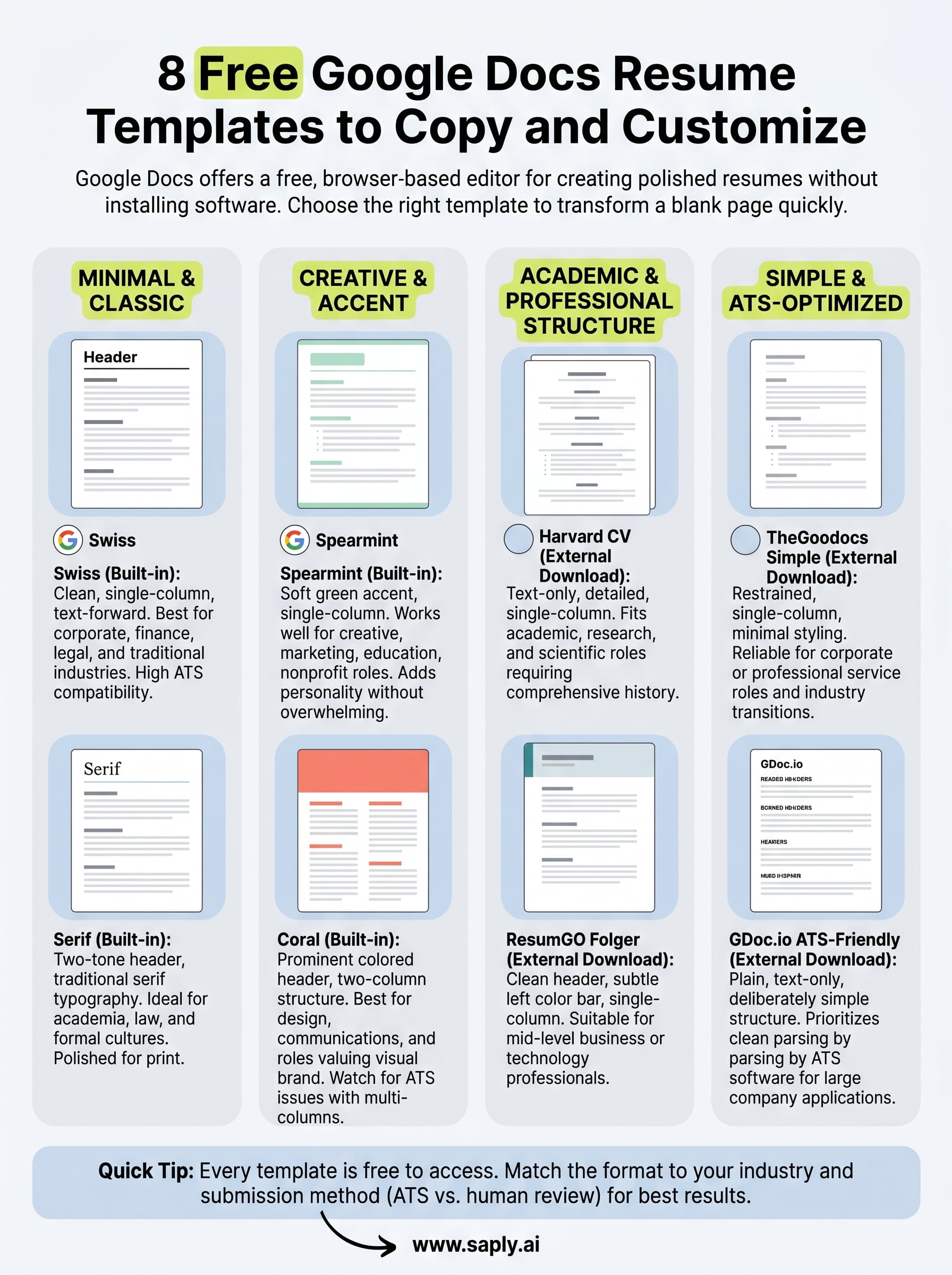
Every template on this list is free to access and easy to copy into your own Google Drive. Whether you do a google docs resume templates download or open one directly through the template gallery, you have everything you need to build a clean, professional resume without starting from scratch. The right template depends on your industry, experience level, and where you plan to submit, so use the notes above to match the format to the role before you start editing.
If you work in staffing or recruitment and manage CV formatting across multiple candidates regularly, the manual work adds up fast. Saply automates that entire process by formatting CVs to your agency’s template, tailoring them to specific job descriptions, and integrating directly with the tools your team already uses. You can try it free for 14 days without entering a credit card to see how much time it saves your team each week.