
recruitment-automation-trends
7 Recruitment Automation Trends Shaping Hiring In 2026
Staffing agencies that still format CVs by hand and manually tailor resumes to job descriptions are losing hours every week, hours their competitors are already reclaiming. The recruitment automation...
Written by: Saply Team
7 Recruitment Automation Trends Shaping Hiring In 2026
Staffing agencies that still format CVs by hand and manually tailor resumes to job descriptions are losing hours every week, hours their competitors are already reclaiming. The recruitment automation trends shaping 2026 aren’t theoretical. They’re actively changing how agencies source, screen, match, and submit candidates, and the firms paying attention are pulling ahead in speed-to-hire.
At Saply, we build AI-powered CV formatting and tailoring tools that plug directly into the platforms recruiters already use, Word, Google Docs, Outlook, Bullhorn, and more. We see firsthand how automation is shifting recruitment workflows from repetitive admin work toward higher-value activities like candidate relationships and client strategy. That perspective informs everything in this article.
Below, you’ll find seven trends worth tracking this year, each with practical context on what’s changing, why it matters for staffing teams, and which tools are driving adoption. Whether you’re evaluating new technology or benchmarking your current stack, this breakdown will help you prioritize what actually moves the needle.
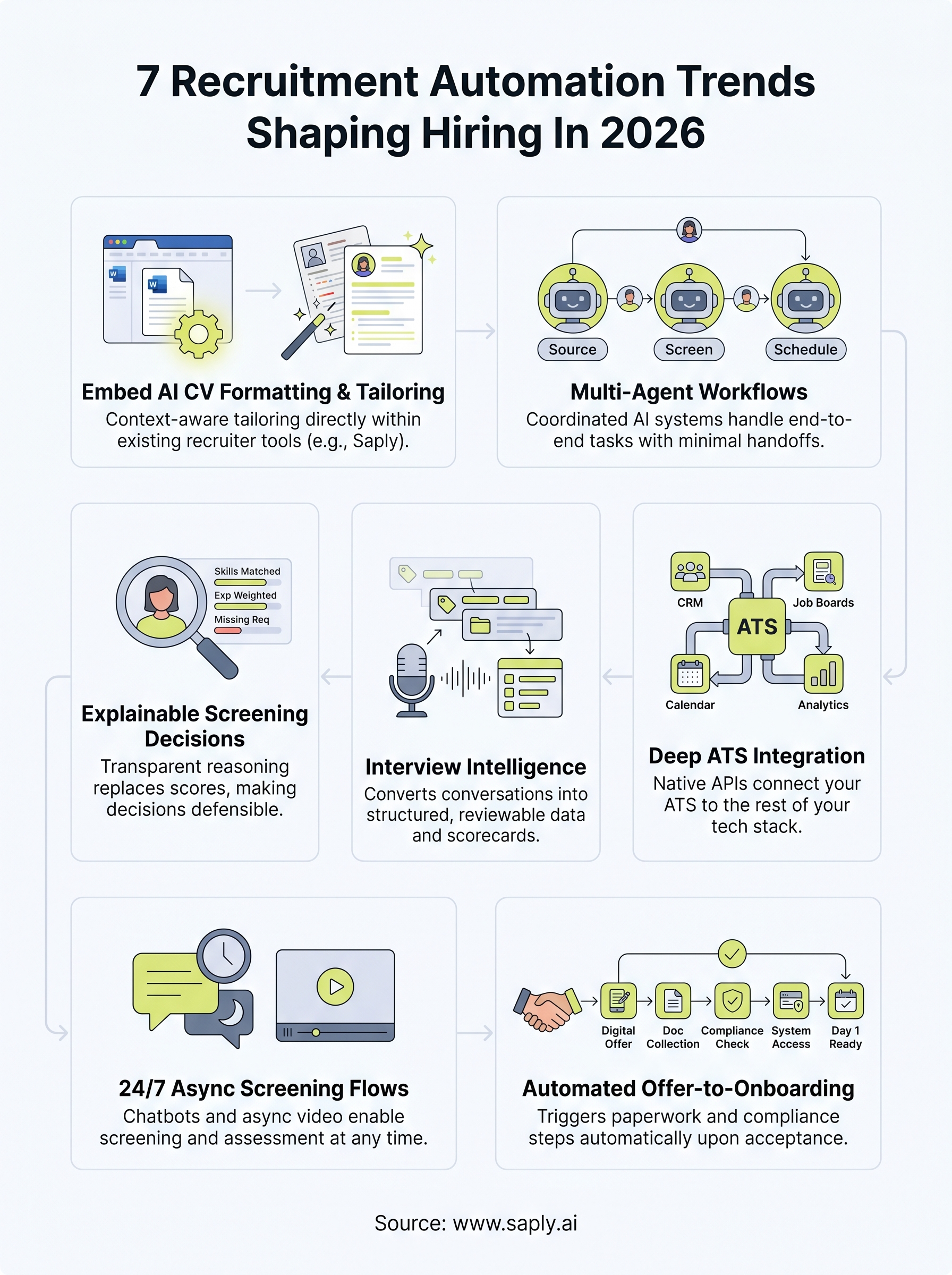
1. Embed AI CV formatting and tailoring in recruiter tools
CV formatting still consumes a disproportionate share of recruiter time at most staffing agencies. In 2026, embedding AI directly into the tools you already use is the shift that eliminates this work without forcing a new platform into your daily workflow.
What changes in 2026
The biggest shift is context-aware formatting that reads both the CV and the job description simultaneously, applies your agency template, and adjusts content emphasis in a single step. Recruiters no longer need to toggle between documents or manually rewrite bullet points to align them with a specific role.
Where staffing teams use it most
High-volume temp and contract desks benefit most because they submit dozens of CVs per week against the tightest turnaround windows. Permanent placement teams use it to produce polished, client-ready submissions faster without sacrificing branding consistency or content quality across the board.
Speed of submission consistently ranks as one of the strongest competitive advantages in staffing, and automation at this specific step directly compounds that edge.
What to automate vs what to keep human
Automate the structural and repetitive formatting work, but keep humans in control of the final review before any submission goes out.
- Automate: template application, section reordering, keyword alignment to job descriptions, and formatting consistency checks
- Keep human: tone judgment, relationship context, and verification of any factual claims about candidate experience
Risks to plan for
Over-relying on automation without a human review step creates accuracy risk, particularly when candidate CVs contain sparse or ambiguous information. You also need to confirm that your AI tool meets data privacy requirements for your region, especially if you operate across jurisdictions with different compliance obligations.
Metrics to track
Track these to measure whether the automation is delivering real efficiency gains on your desk:
- Time-to-submission per role
- CV revision rounds requested by clients before acceptance
- Submission-to-interview conversion rate across formatted vs. unformatted submissions
Where Saply fits
Saply works inside Microsoft Word, Google Docs, Outlook, Bullhorn, Carerix, and Spott, so you stay entirely within your existing workflow. Among the recruitment automation trends with immediate ROI, CV formatting and tailoring automation stands out because you repeat this task dozens of times each week and every minute recovered adds up fast.
2. Use multi-agent workflows to run end-to-end hiring
Single-task automation handles one step at a time. Multi-agent workflows chain multiple AI systems together so they hand off tasks between each other automatically, covering sourcing, screening, scheduling, and communication inside a single coordinated pipeline. This is one of the recruitment automation trends gaining serious traction in enterprise staffing operations right now.

What changes in 2026
Orchestration layers now let you configure specialized agents for distinct hiring stages that communicate with each other without human input between steps. An agent that screens applicants passes qualified profiles directly to a scheduling agent, which then triggers a communication agent to send confirmations.
When agents hand off cleanly between stages, your team only steps in where judgment is genuinely required, not to move data from one place to another.
Where staffing teams use it most
High-volume temporary staffing desks see the biggest gains because they run identical hiring flows repeatedly across dozens of open roles simultaneously. Agencies managing RPO contracts also use multi-agent setups to hit SLA targets without scaling headcount proportionally.
What to automate vs what to keep human
- Automate: applicant routing, status updates, interview scheduling, and rejection communications
- Keep human: offer negotiation, client relationship updates, and any edge case that falls outside your standard flow
Risks to plan for
Poorly configured agent handoffs create compounding errors that are hard to trace back to the source. Audit your workflows regularly and build in human checkpoints at high-stakes decision points.
Metrics to track
- Pipeline throughput per recruiter per week
- Time between application and first interview
- Drop-off rate at each automated stage
3. Replace black-box screening with explainable decisions
Screening automation has existed for years, but most tools give you a score with no explanation behind it. In 2026, the shift across recruitment automation trends is toward systems that show their reasoning, so recruiters and candidates alike understand exactly why a profile ranked where it did.
What changes in 2026
New screening tools now surface factor-level explanations alongside every candidate score, listing which skills matched, which were missing, and how heavily each element was weighted. This transparency moves screening from a guessing game to a defensible, auditable process you can stand behind with clients and candidates.
Where staffing teams use it most
High-volume role types like logistics, light industrial, and administrative staffing benefit most because the sheer number of applicants makes manual review impossible. Explainable screening lets your team validate decisions quickly rather than override them blindly.
When your screening tool can show a client exactly why a candidate ranked first, you stop defending your process and start building client confidence instead.
What to automate vs what to keep human
Your screening tool should handle the repetitive ranking work while your recruiters own the final call on borderline candidates.
- Automate: initial scoring, factor weighting, and ranking against job criteria
- Keep human: final shortlist decisions and any candidate who falls near the threshold
Risks to plan for
Bias embedded in training data can produce explainable but still unfair outputs. Audit your scoring criteria regularly against equal opportunity standards and review flagged edge cases before they become compliance issues.
Metrics to track
These numbers tell you whether explainable screening is actually improving your submission quality over time.
- Shortlist acceptance rate by client
- Time spent reviewing screened candidates per role
- Candidate dispute rate on screening outcomes
4. Turn interviews into structured data with interview intelligence
Most interview feedback lives in recruiter notes that never get reviewed again. Interview intelligence tools change that by automatically transcribing, scoring, and tagging conversations so you can act on what was actually said. This is one of the recruitment automation trends that converts a traditionally subjective step into a repeatable, reviewable process.
What changes in 2026
Tools now generate structured scorecards automatically from interview recordings, pulling out competency signals, red flags, and candidate responses by category. Your team reviews a formatted summary instead of raw notes.
When every interview produces consistent structured data, comparing candidates across a large shortlist becomes a faster and more defensible process.
Where staffing teams use it most
Technical and specialist roles benefit most because competency evaluation is complex and interviewer consistency matters more when the skill bar is higher. Agencies running volume hiring campaigns also use these tools to reduce interviewer prep time per candidate.
What to automate vs what to keep human
- Automate: transcription, competency tagging, and scorecard generation
- Keep human: final hiring recommendation and any sensitive conversations that require discretion
Risks to plan for
Transcription accuracy drops with heavy accents or poor audio quality, which can distort the structured output. Always give interviewers a way to flag corrections before a scorecard is finalized.
Metrics to track
- Interviewer consistency score across the same role type
- Time spent on post-interview documentation per recruiter
- Interview-to-offer conversion rate by role category
5. Connect your ATS with the rest of your stack
Your ATS stores candidate data, but if it doesn’t talk to your CRM, job boards, communication tools, and reporting dashboards, your team fills the gaps manually. Among the recruitment automation trends picking up speed in 2026, deep ATS integration is removing those manual bridges entirely.

What changes in 2026
Native APIs and no-code connectors now let you link your ATS to the rest of your stack in hours rather than weeks. Data flows between your sourcing tools, calendars, and reporting layers without custom development or IT involvement.
Where staffing teams use it most
Contract and temp desks use ATS integrations to sync candidate availability data directly into scheduling tools. Permanent placement teams connect their ATS to CRM platforms so client and candidate history stays current without duplicate data entry across systems.
When your ATS pushes updates automatically across your stack, your team stops acting as a data transfer service and starts focusing on placements.
What to automate vs what to keep human
- Automate: data syncing, status updates, and job board posting across platforms
- Keep human: relationship notes, client-specific context, and any data that requires judgment before it moves
Risks to plan for
Data duplication is the most common failure point when multiple systems sync the same fields. Define a single source of truth for each data type before you connect systems, or conflicting records will create more work than the integration saves.
Metrics to track
- Manual data entry time per recruiter per week
- Data accuracy rate across connected platforms
- Time between ATS status change and downstream system update
6. Run candidate screening 24/7 with chat and async flows
Candidates don’t apply during business hours, but most screening workflows still wait until the next morning to respond. Among the recruitment automation trends gaining ground in 2026, running asynchronous and chat-based screening around the clock is one of the most direct ways to cut response lag without adding headcount.
What changes in 2026
AI chat tools now handle initial screening conversations at any hour, collecting availability, salary expectations, and key qualifications before a recruiter logs in. Async video platforms let candidates complete structured assessments on their own schedule, which removes the back-and-forth of booking a first call entirely.
Where staffing teams use it most
High-volume temp and light industrial desks see the biggest gains because candidate windows are short and applicants often contact multiple agencies at the same time. Speed of first contact directly affects whether you secure the placement or lose the candidate to a faster competitor.
The agency that responds first wins the candidate, and automated screening closes that gap without putting your team on-call.
What to automate vs what to keep human
Your automation covers the repetitive qualification steps, while your recruiters own the decisions that affect candidate experience and placement accuracy.
- Automate: initial qualification questions, availability capture, and screening summaries
- Keep human: sensitive role requirements and final qualification decisions
Risks to plan for
Poorly scripted chat flows confuse candidates and create drop-off before the screening completes. Audit your conversation logic regularly to keep it accurate and on-brand across every role type.
Metrics to track
Track these to confirm your async screening is actually converting applicants faster across your desk.
- Time-to-first-contact after application
- Screening completion rate through chat vs. manual outreach
- Application-to-screened conversion rate by channel
7. Automate the handoff from offer to onboarding and compliance
Once a candidate accepts an offer, the work doesn’t stop. The gap between offer acceptance and day one is where documentation stalls, compliance steps get missed, and candidate confidence drops. Among the recruitment automation trends advancing in 2026, automating this handoff is the step that protects your placements after the hard work is already done.
What changes in 2026
Automated offer-to-onboarding workflows now trigger document collection, compliance checks, and system access requests the moment a candidate signs. Your team no longer needs to chase paperwork manually or track which step is still pending across a spreadsheet.
Where staffing teams use it most
Contract and temp desks rely on this most because compliance requirements are stricter and turnaround windows are tighter. Agencies placing candidates across multiple clients use automation to standardize documentation regardless of which recruiter handles the individual placement.
When your compliance process runs automatically, you stop relying on individual recruiters to remember every step and start guaranteeing consistency across every placement.
What to automate vs what to keep human
- Automate: document collection, compliance verification, welcome communications, and system provisioning requests
- Keep human: sensitive conversations about role expectations and any candidate who raises concerns before their start date
Risks to plan for
Compliance rules vary by jurisdiction, so a workflow built for one region may skip required steps in another. Review your automation against local labor regulations before rolling it out across your full operation.
Metrics to track
- Time between offer acceptance and day-one readiness
- Document completion rate before the start date
- Compliance error rate per placement
Next steps
The recruitment automation trends covered in this article aren’t waiting for 2027. They’re live, actively in use, and already separating the agencies that submit faster and place more reliably from those still burning hours on manual admin. Each trend in this list targets a specific bottleneck, and you don’t need to implement all seven at once to see results.
Start with the bottleneck that costs your team the most time right now. For most staffing agencies, CV formatting and tailoring is the easiest place to recover hours immediately because it happens dozens of times every week without adding any strategic value to the process.
If that’s where your desk bleeds time, try Saply free for 14 days and see how much faster your team moves when formatting and tailoring run automatically inside the tools you already use every day.