
how-to-reduce-time-to-hire
10 Proven Tactics: How To Reduce Time To Hire in 2026
Every open role has a cost. The longer a position stays unfilled, the more your clients lose in productivity, morale, and revenue. For staffing agencies competing on speed, knowing how to reduce time...
Written by: Saply Team

10 Proven Tactics: How To Reduce Time To Hire in 2026
Every open role has a cost. The longer a position stays unfilled, the more your clients lose in productivity, morale, and revenue. For staffing agencies competing on speed, knowing how to reduce time to hire isn’t optional, it’s the difference between placing candidates and losing them to a faster competitor.
The average time to hire across industries still hovers around 44 days, according to SHRM’s latest benchmarks. But top-performing agencies are cutting that number significantly by rethinking where their recruiters spend time. A huge chunk of the bottleneck isn’t sourcing or interviewing, it’s the administrative work in between. Formatting CVs, tailoring them to job descriptions, matching candidates to roles, these tasks eat hours every week without moving a single candidate closer to an offer. That’s exactly the problem we built Saply to solve: eliminating manual CV formatting and tailoring so recruiters can submit candidates faster, directly from the tools they already use.
This article breaks down 10 specific tactics you can implement to shorten your hiring cycle in 2026. Some are process changes, others are technology shifts, and a few will challenge how your team prioritizes daily work. Each one is grounded in what actually moves the needle for recruitment teams handling high-volume placements, no vague advice, just practical steps you can act on this week.
1. Automate CV formatting and tailoring with Saply
Before a single candidate reaches a hiring manager, recruiters spend significant time on manual CV work: reformatting layouts, applying agency templates, and rewriting bullet points to fit a job description. This is one of the most direct levers for how to reduce time to hire, and it’s one most teams overlook because the work feels routine rather than fixable.
Where CV prep slows down time to hire
CV prep creates friction at every handoff. A recruiter receives a raw candidate CV, spends 20 to 40 minutes reformatting it to match the agency template, then spends more time manually tailoring the content to a specific role. Multiply that across five to ten active submissions a week and you lose hours that could go toward sourcing or client communication.

How Saply speeds up submissions to hiring managers and clients
Saply plugs directly into Microsoft Word, Google Docs, and Outlook, so your recruiters never leave the tools they already use. With one click, the platform applies your agency’s CV template and pulls job description details to tailor the candidate’s profile automatically. Submission prep that used to take 30 minutes can be done in a few minutes without touching formatting manually.
The fastest-submitting agencies don’t work harder than their competitors - they eliminate the manual steps between “candidate sourced” and “CV sent.”
How to use job-based tailoring without rewriting resumes
Connect Saply to your ATS system (Bullhorn, Carerix, or Spott) and the platform pulls the active job description directly into the tailoring workflow. It identifies skill matches, flags gaps, and adjusts CV language to align with role requirements without you rewriting the candidate’s experience. You review and approve; you don’t draft from scratch.
How to standardize templates across recruiters and teams
Inconsistent formatting wastes time because senior recruiters end up correcting junior submissions before they go out. Saply integrates your custom CV template within 48 hours, then enforces it automatically across every submission your team produces. Every recruiter works from the same baseline, which removes correction loops entirely.
What to measure to prove impact on time to hire
Track average CV prep time per submission before and after implementing Saply, then connect it to submission volume per recruiter per week. A drop in prep time with a corresponding rise in submissions per recruiter is your clearest signal that the automation is working.
2. Lock role requirements before you post
Vague role definitions are one of the most common reasons time to hire stretches past 30 days. When hiring managers and recruiters disagree on what “qualified” means, you end up rerunning screens, revisiting candidates, and rewriting job posts mid-process. Locking requirements upfront eliminates that rework entirely.
The 30-minute intake that prevents rework later
Before you write a single job post, schedule a structured intake call with the hiring manager. Cover the role scope, the team context, the non-negotiables, and the ideal start date. Thirty minutes of alignment at the start prevents three weeks of misaligned submissions later.
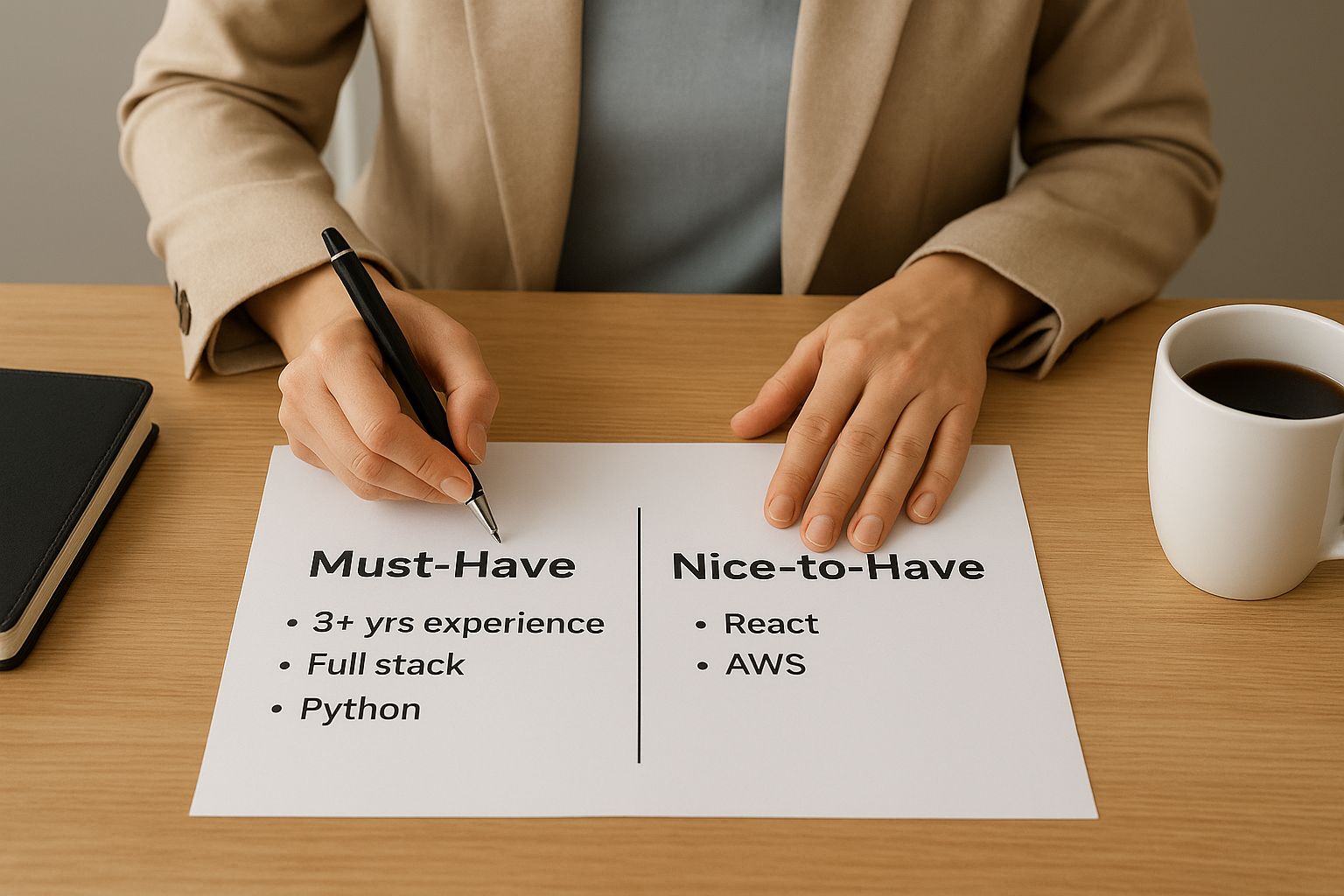
How to define must-haves vs nice-to-haves
Split requirements into two clear columns: criteria a candidate must meet to move forward, and criteria that would strengthen their profile but won’t disqualify them. This single distinction cuts screening time because every reviewer applies the same filter.
How to set pass-fail criteria for early screening
Identify two or three specific signals that make a candidate a clear no before they reach a recruiter screen. Use these as knockout questions on your intake form. Removing borderline candidates early keeps your pipeline clean and your reviewers focused.
How to align on compensation range and leveling upfront
Late-stage offer drops often trace back to compensation conversations that never happened during intake. Confirm the approved salary band and job level before the role goes live so you never pitch a candidate the team can’t afford.
Misaligned expectations at the start of a search cost more time than any bottleneck later in the process.
How to track time to hire vs time to fill correctly
These two metrics measure different things. Time to fill starts when the role opens; time to hire starts when a specific candidate enters the process. Tracking both helps you understand whether slow hires come from sourcing delays or from decision-making gaps inside the process, which tells you exactly how to reduce time to hire at each stage.
3. Build a warm talent pipeline before roles open
Waiting until a role opens to start sourcing is one of the fastest ways to extend your hiring timeline. A pre-built pipeline means your first qualified submission goes out days after a role is confirmed, not weeks, which is one of the clearest answers to how to reduce time to hire without changing your interview process at all.
Which roles need a pipeline most
Not every role justifies proactive sourcing, but high-volume or frequently recurring positions do. Focus pipeline-building on roles you fill repeatedly, such as software engineers, sales reps, or customer support leads, where demand is predictable and the talent pool stays relatively stable.
How to keep silver-medalist candidates warm
Candidates who reached final rounds but didn’t get an offer are your fastest re-engagement targets. Tag them in your ATS, note the gap that cost them the role, and send a personal check-in every 60 to 90 days. When a matching role opens, you start with a pre-screened candidate instead of a cold search.
A silver-medalist who already cleared two interview rounds can cut your time to hire by half compared to sourcing someone new.
How to use referrals without slowing down review
Referrals speed up sourcing but can clog your pipeline if every submission skips standard screening. Set clear criteria for what makes a referral ready to review so your team doesn’t spend time on candidates who don’t meet the baseline.
How to segment candidates by skills and start date
Organize your pipeline by role type and availability window, not just by name. A candidate available in two weeks is a different asset than one giving 60 days’ notice.
Pipeline metrics that predict faster hires
Track pipeline coverage ratio (qualified candidates per open role) and re-engagement response rates. When coverage drops below two candidates per role, you have an early warning to source before demand hits.
4. Fix the job description to attract qualified applicants
A poorly written job description doesn’t just hurt application quality; it stretches your entire hiring process. When the post attracts the wrong candidates, your team spends time screening people who were never a fit, which is one of the most avoidable ways to inflate time to hire.
How unclear requirements inflate screening time
Vague language in job posts creates ambiguity that candidates interpret generously. When your requirements say “strong communication skills” or “experience in a fast-paced environment,” everyone applies, including candidates two levels below the target. Your screening volume rises while your conversion rate drops.
How to write for the right level and scope
Be specific about scope, seniority, and output. Instead of “manage projects,” write “own delivery of three concurrent client accounts.” Concrete language filters the candidate pool before a single application reaches your inbox.
Specific requirements attract specific candidates. Every vague line in your job post adds unqualified applications to your queue.
How to reduce low-fit applicants with simple filters
Add two or three required fields to your application form that reflect genuine role requirements: years of experience in a specific tool, location, or license. These act as soft knockout filters without a formal screening round.
How to remove biased or vague language that hurts volume
Words like “rockstar,” “ninja,” or “cultural fit” discourage qualified candidates from applying and reduce your pipeline without improving quality. Replace them with clear competency descriptions tied to actual job performance.
Job ad signals to monitor weekly
Track application-to-screen ratio and screen-to-interview conversion. A low screen rate signals that your job post attracts low-fit applicants, which tells you exactly where to tighten the language.
5. Shorten screening with skills-first intake
Screening is where most hiring pipelines quietly stall. Resume-based screening forces recruiters to guess at fit rather than confirm it, which adds unnecessary rounds and delays. A skills-first intake approach replaces that guesswork with direct, job-relevant signals so you move the right candidates forward faster.
How to replace resume guessing with job-relevant signals
A resume tells you where someone has been, not what they can do in your specific role. Replace open-ended CV review with structured intake questions tied directly to the must-have criteria you locked during the role intake. Ask candidates to confirm specific qualifications or submit brief answers that reflect real job tasks.
How to use knockout questions without losing good people
Knockout questions work best when they target clear disqualifiers, not general fit. Limit them to two or three questions that reflect genuine requirements, such as certification, location, or minimum experience level. Avoid questions that screen out strong candidates over preferences rather than actual role needs.
Knockout questions should disqualify the clearly wrong candidates, not narrow your pipeline on assumptions.
How to run fast, consistent recruiter screens
Standardize your recruiter screen to 20 minutes with a fixed set of five or six questions every candidate answers in the same order. Consistency cuts review time because every screen produces comparable, structured data rather than notes that vary by recruiter.
How to reduce back-and-forth with missing info
Send candidates a pre-screen checklist before the call that confirms availability, compensation expectations, and right-to-work status. This eliminates the most common reasons a screen gets rescheduled or extended.
Screening metrics that expose bottlenecks
Track screen-to-interview conversion rate and average time from application to completed screen. Low conversion signals misaligned sourcing; slow screen completion signals a scheduling or capacity problem. Both directly affect how to reduce time to hire at the earliest stage of your process.
6. Automate scheduling and candidate communication
Scheduling is one of the most underestimated drains on your hiring timeline. Back-and-forth emails to confirm a mutual interview time can burn two to four days per candidate, and across a full pipeline, that adds up to weeks of avoidable delay. Automating this step cuts friction without changing your evaluation process.
Why scheduling delays quietly add weeks
Every manual scheduling exchange adds idle time that no one tracks as a bottleneck. A candidate submits availability on Monday, your recruiter responds Wednesday, and the interview lands Friday. That’s four days spent on logistics, not assessment. Multiply that across five active candidates and you lose a week that never appears in your pipeline report.
Scheduling friction doesn’t look like a problem until you measure how much time candidates spend waiting between steps.
How to set interview blocks and protect calendars
Block dedicated interview windows on hiring manager calendars at the start of every search, not after you have candidates ready. Two or three protected slots per week prevent the “I’m not available until next Tuesday” delay that repeatedly pushes your timeline back.
How to use self-scheduling without creating chaos
Give candidates a direct booking link tied to pre-approved calendar blocks. Set clear guardrails on how far out they can book and which interviewers are available for which rounds. This removes the recruiter from the scheduling loop without giving candidates open access to full calendars.
How to keep candidates engaged between steps
Send a brief update after every stage confirmation so candidates know what to expect and when. Silence between steps increases drop-off, particularly for candidates fielding competing offers.
Candidate experience metrics tied to acceptance rates
Track time between stages and candidate response rates at each step. Slower stage transitions correlate directly with lower acceptance rates, which makes fixing scheduling gaps one of the clearest ways to reduce time to hire at the close stage.
7. Run structured interviews with fewer rounds
Unstructured interview loops drag on because no one owns a specific decision. Every round that lacks a clear purpose adds days to your timeline, and candidates start dropping off before you reach a conclusion. Cutting rounds and adding structure is one of the most direct ways to reduce how to reduce time to hire at the evaluation stage.
How to choose the minimum number of rounds
Map each interview round to a specific hiring question: technical fit, role scope, leadership, or final sign-off. If two rounds answer the same question, remove one. Most roles need three rounds or fewer to gather enough data to make a confident offer.
How to assign each interviewer a clear lane
Give each interviewer one defined area to assess and brief them not to overlap with others. When every interviewer covers different ground, your debrief produces a complete picture without redundant questions or competing impressions.
How to use scorecards to speed up decisions
A scorecard tied to your must-have criteria gives every interviewer a consistent scoring framework rather than loose notes. Reviewers submit scores before the debrief so the conversation starts with structured data, not impressions formed in the room.

Scorecards replace “I just had a good feeling” with criteria everyone agreed on before the first candidate arrived.
How to run panel interviews without overwhelming candidates
Limit panels to two or three interviewers and assign each a defined role before the session. Brief the panel in advance so they coordinate questions rather than repeat the same ones, which keeps the conversation focused and the candidate experience intact.
Interview loop metrics to review after every hire
Track rounds per hire and the number of days between interview stages after every placement closes. If your average exceeds three rounds or stages run more than three days apart, your loop needs tightening before the next search starts.
8. Get faster feedback from hiring teams
Hiring managers are often the biggest variable in how to reduce time to hire. The sourcing and screening work moves fast, but then candidates wait days for a decision no one owns. Setting clear expectations with hiring teams before the search starts closes that gap.
How to set simple SLAs for review and feedback
Give every hiring manager a 24-hour SLA to review submitted CVs and a 48-hour SLA to return interview feedback. Put these in writing at the start of the search so the expectation is set, not assumed.
How to prevent “resume limbo” and stalled candidates
Unreviewed CVs are silent pipeline killers. Build a weekly check that flags any submission without a response after 24 hours, then escalate directly to the hiring manager rather than waiting for them to circle back.
Candidates who wait more than three days for feedback are already exploring other roles.
How to run same-day debriefs that end with a decision
Schedule a 30-minute debrief immediately after the final interview, while impressions are fresh. The meeting should produce a clear next step: move to offer, hold, or close. Leaving without a decision means the candidate waits another day for a call.
How to resolve disagreement without adding another round
When interviewers disagree, refer back to the scorecard criteria rather than scheduling another round. One person should own the final call, and that person should be identified before the search begins.
Stakeholder metrics that keep the process honest
Track average hiring manager response time and the number of candidates who go stale before a decision is made. Both metrics expose where feedback delays are adding days to your cycle.
9. Close faster with offers and parallel checks
The offer stage is where fast pipelines stall for avoidable reasons: approvals, paperwork, and checks that run one after another instead of at the same time. Fixing this stage is one of the clearest ways to reduce how to reduce time to hire at the finish line.
How to pre-approve offer bands and reduce approvals
Get written sign-off on your salary band and package structure before the search opens, not after you’ve selected a finalist. When compensation is pre-approved, you eliminate a full approval loop at the most time-sensitive moment in the process.
How to prepare an offer packet before the final interview
Build the offer letter, start date options, and onboarding documents while your finalist is still in the final round. Waiting until after the decision adds two to three days of prep time when the candidate is most likely to receive competing offers.
Candidates who wait more than 48 hours after a final interview for a formal offer are already reconsidering their options.
How to parallelize references, background checks, and paperwork
Start reference requests and background check consent forms as soon as a candidate enters final rounds, not after the offer is accepted. Running these in parallel compresses your post-offer timeline by several days.
How to reduce offer drop-off with clear timelines
Tell candidates exactly when they’ll receive the formal offer and when you need a response by. Ambiguity at this stage creates anxiety, which increases the chance they accept a competing role while waiting.
Close-stage metrics that protect your top choice
Track offer acceptance rate and average days from final interview to signed offer. Both metrics tell you whether your close stage is protecting or losing the candidates your process already invested in.
Next steps
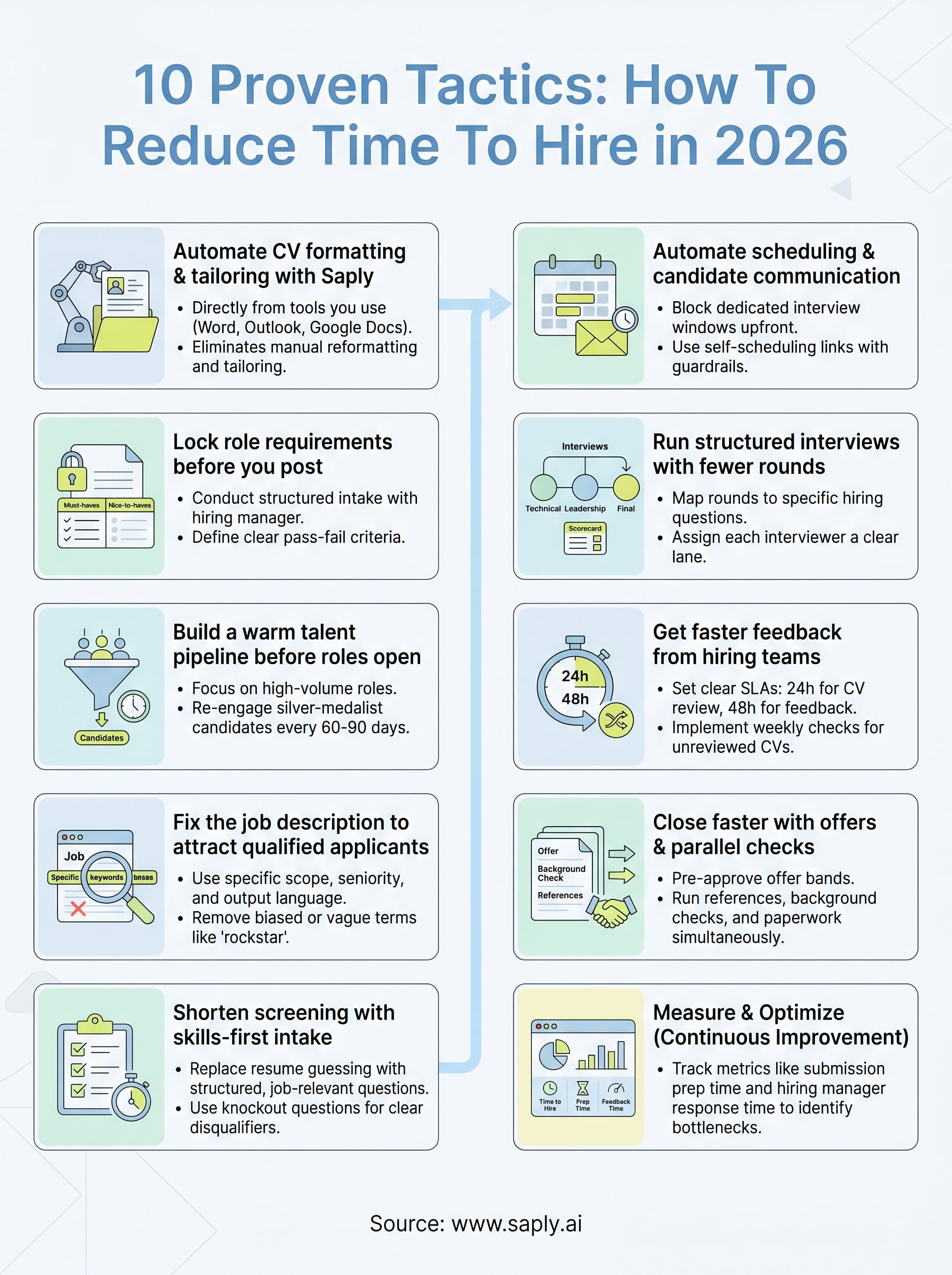
Every tactic in this article targets a specific point in your hiring cycle where time gets lost. Some fixes take an afternoon, like locking role requirements before you post or setting feedback SLAs with your hiring team. Others, like building a warm talent pipeline or parallelizing background checks, require a small process shift that pays off across every search you run.
The fastest gains, though, come from eliminating manual CV work before candidates ever reach a hiring manager. That single change reduces submission prep from 30 minutes to a few minutes per candidate, which directly compresses how to reduce time to hire at the earliest stage of your process. If your recruiters are still formatting and tailoring CVs by hand, that is where you start.
Start your free 14-day trial of Saply and see how much time your team gets back on the first day.