
how-to-tailor-cv-to-job-description
How To Tailor a CV To a Job Description for More Interviews
A generic CV gets ignored. Recruiters and hiring managers spend seconds scanning each application, and if your resume doesn't reflect what the role actually asks for, it ends up in the reject pile. Kn...
Written by: Saply Team
How To Tailor a CV To a Job Description for More Interviews
A generic CV gets ignored. Recruiters and hiring managers spend seconds scanning each application, and if your resume doesn’t reflect what the role actually asks for, it ends up in the reject pile. Knowing how to tailor a CV to a job description is the single most effective thing you can do to land more interviews, whether you’re a candidate applying directly or a recruiter preparing submissions for clients.
The process isn’t complicated, but it does require attention to detail. You need to read the job posting carefully, identify what matters most, and reshape the CV so it speaks directly to those requirements. Skip this step, and you’re competing on luck. Do it well, and you stand out before the conversation even starts. For staffing agencies handling dozens of submissions a week, this is where tools like Saply come in, automating the tailoring and formatting work so recruiters can move faster without cutting corners.
This guide breaks down exactly how to tailor a CV to any job description, step by step. You’ll learn what to look for in a posting, which sections to adjust, how to handle keywords, and how to avoid common mistakes that weaken an otherwise strong resume.
What tailoring means and when it matters
Most people think tailoring a CV means swapping out a few words at the top. In reality, it means systematically aligning your CV’s content with what a specific employer has said they need, using the job description as your primary guide. Understanding how to tailor a CV to a job description properly means touching multiple sections: your profile summary, your skills list, your bullet points under each role, and sometimes even the order in which you present information. A tailored CV reads like it was written for that role specifically, not pulled from a file folder labeled “general application.”
What tailoring actually changes in a CV
Tailoring isn’t surface-level editing. When you do it correctly, you’re reordering priorities to match what the employer values most, not just inserting keywords. If a job description emphasizes project management above everything else, your CV should lead with clear evidence of project management experience before anything else, even if you’re prouder of a different achievement. The reader shouldn’t have to hunt for proof that you fit the role.
Here’s what tailoring typically affects across a standard CV:
- Profile summary: Rewritten to speak directly to the role and industry context
- Skills section: Adjusted to mirror the exact language in the posting (for example, “stakeholder communication” rather than “client relations” if that’s the phrase the employer uses)
- Work experience bullets: Restructured so the most relevant responsibilities and measurable results appear first under each position
- Certifications or education: Moved higher if the job posting flags them as a specific requirement
A tailored CV doesn’t hide who you are. It surfaces the most relevant version of you for that specific opportunity.
When tailoring makes the biggest difference
Tailoring matters most in competitive roles where many qualified candidates apply. If a job receives 200 applications and most CVs look similar, a tailored submission stands out immediately because it reads like it belongs there. Recruiters notice when a CV feels generic, and applicant tracking systems flag mismatched language before a human even sees the file.
That said, tailoring isn’t always equally urgent. Here’s a quick breakdown of when to invest the effort:
| Situation | Tailoring priority |
|---|---|
| Competitive role with 50+ applicants | High |
| Direct referral with a warm introduction | Medium |
| Niche role where your background is rare | Medium |
| Mass application to similar roles | Low (use a strong base CV) |
You should always tailor when the stakes are high and a specific role is genuinely worth your time. Applying to 50 jobs with the same document wastes the opportunity that careful tailoring creates. Focus on quality over volume, and your interview rate will reflect that approach.
Step 1. Break down the job description
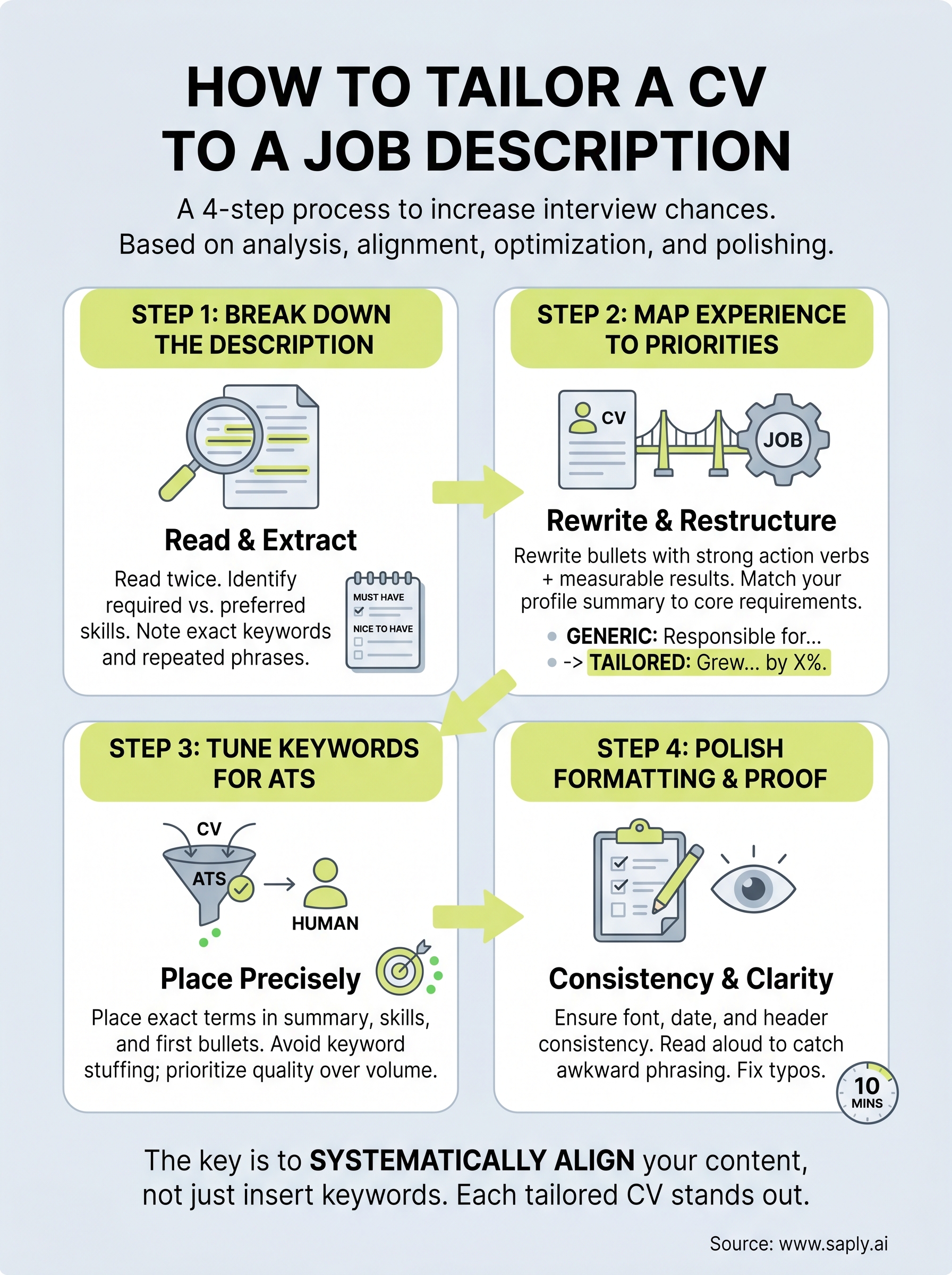
Before you can know how to tailor a CV to a job description, you need to understand what the posting is actually telling you. Most job descriptions contain three distinct layers of information: what the role requires on day one, what the employer values long-term, and what they’re hoping for but won’t always state outright. Reading the posting at least twice before touching your CV, once for the overall picture and once to extract specific language, gives you a clear foundation to build on.
Read the job description at least twice: once for the overall picture, and once to pull out the specific language that keeps repeating.
How to extract what matters most
Start by copying the full job description into a plain text document or a notes app. Then go through it with a clear framework. Mark each item as required (listed under “must have” or “essential”) or preferred (listed under “nice to have” or “preferred”). This distinction matters because required skills must appear directly in your CV, while preferred skills can be woven in where they’re honest and relevant.

Use this breakdown template to organize what you find:
| Category | What to look for | Where to use it in your CV |
|---|---|---|
| Job title keywords | Exact title or close variants | Profile summary, headline |
| Required skills | Listed as “must have” or “essential” | Skills section, bullet points |
| Preferred skills | Listed as “nice to have” | Bullet points, profile |
| Repeated phrases | Same word appears 3+ times | Mirror this language throughout |
| Soft skills | Communication, leadership, teamwork | Summary and experience bullets |
Pay close attention to repeated language across the entire posting. If the employer writes “cross-functional collaboration” three times, that’s a strong signal that it’s a core priority. Use that exact phrase in your CV rather than a synonym, because both applicant tracking systems and human reviewers respond to language that mirrors the original posting directly.
Step 2. Map your experience to their priorities
Once you’ve broken down the job description, the next task is matching what you’ve done in your career to what the employer actually needs. This step is where knowing how to tailor a CV to a job description moves from analysis to action. Pull out the list of required and preferred skills you identified in Step 1, then work through your existing CV role by role. For each position, ask yourself: which of my responsibilities or results directly supports what this employer is asking for? Start there, and restructure your content around those answers.
How to rewrite your bullet points
Your bullet points carry the most weight in any CV, and most people write them in a way that describes duties rather than results. Rewrite each relevant bullet to lead with a strong action verb and end with a measurable outcome wherever possible. If the job description asks for experience managing client accounts, don’t write “Responsible for accounts.” Write “Managed a portfolio of 30+ client accounts, maintaining a 94% retention rate over two years.” That version answers the employer’s requirement directly and gives them something concrete to evaluate.
Use this rewrite template for your bullet points:
| Before (generic) | After (tailored) |
|---|---|
| Responsible for social media | Grew LinkedIn following by 40% over 6 months through targeted content strategy |
| Helped with onboarding | Led onboarding for 15 new hires, reducing ramp-up time by 3 weeks |
| Worked on client projects | Delivered 12 client projects on time and within budget across a 12-month period |
The goal is not to exaggerate. It’s to surface the most relevant version of your real experience.
Match your profile summary to the role
Your profile summary sits at the top of the CV and sets the frame for everything below it. Rewrite it from scratch for each application rather than editing the old version. Use the job title and two or three of the employer’s highest-priority requirements in the first two sentences, and keep it to four lines maximum.
Step 3. Tune keywords for ATS without stuffing
Knowing how to tailor a CV to a job description means understanding that your CV passes through software before it reaches a human. Most companies and staffing agencies run applications through an applicant tracking system (ATS) that scans for specific keywords before ranking or filtering candidates. If your CV doesn’t contain the right terms, it may never surface, regardless of how strong your actual experience is. The fix isn’t to flood your document with keywords. It’s to place the right ones in the right spots so the system registers them and the reader isn’t distracted.
Keyword placement is about precision, not volume. One well-placed term in context beats five awkward insertions.
How ATS systems scan your CV
ATS platforms parse your CV by breaking it into sections and comparing the text against the job description or a set of predefined terms. They look for exact matches and close variants. That means if the job posting says “budget management” and your CV says “oversaw spending,” the system may not count it as a match. Use the exact phrasing from the posting wherever it’s accurate and fits naturally in a sentence. You don’t need to game the system. You just need to speak its language.
Where to place keywords for maximum effect
The highest-impact locations in any CV for keyword placement are your profile summary, skills section, and the first bullet under each role. These areas carry the most weight with both ATS filters and human reviewers. Use this placement guide to work through your keyword list systematically:

| Keyword type | Best placement location |
|---|---|
| Job title or close variant | Profile summary, headline |
| Required technical skills | Skills section, role bullets |
| Soft skills (leadership, communication) | Profile summary, key bullets |
| Industry-specific terminology | Throughout experience section |
| Certifications or tools | Skills section, relevant role |
Avoid repeating the same keyword more than two or three times in the full document. Once it appears in your summary and once in your experience, the ATS has registered it. Overusing terms makes the CV read as unnatural to the human reviewer who ultimately decides whether to call you.
Step 4. Polish formatting and proof in 10 minutes
After you finish tailoring the content, spend 10 focused minutes on formatting and proofreading before you submit. This final pass is where many candidates lose ground. A CV that reads well but looks inconsistent or contains typos signals carelessness to the reviewer, undoing the careful work you put into learning how to tailor a CV to a job description in the first place.
Fix formatting inconsistencies first
Inconsistent formatting is one of the first things a recruiter notices, even if they can’t articulate why. Check that every section header uses the same font size and weight, that all bullet points align cleanly, and that your date format stays consistent throughout. Mixing “Jan 2022” in one place with “January 2022” in another is a small detail, but it stands out.
A visually clean CV tells the reviewer you’re organized before they read a single word.
Use this checklist to move through formatting and proofreading efficiently:
| Task | What to check |
|---|---|
| Font consistency | Same typeface and size across all body text |
| Header hierarchy | Uniform sizing for all section titles |
| Date format | One format used throughout the entire document |
| Bullet alignment | All bullets flush and evenly spaced |
| White space | Margins balanced, no crowded sections |
| Spelling | Run a spellcheck, then read manually |
| Keyword accuracy | Confirm tailored terms match the posting exactly |
Read it aloud before you send
Reading your CV aloud catches problems that silent reading misses. Your ear notices awkward phrasing and clunky sentences faster than your eyes do. Work through each section at a normal speaking pace and mark anything that makes you pause or stumble. Those pauses signal that a sentence needs a rewrite.
Pay close attention to your bullet points specifically, since that’s where most awkward phrasing hides after heavy editing. If a bullet doesn’t land clearly in three seconds when spoken aloud, simplify it until it does.
Next steps
You now have a complete, repeatable process for how to tailor a CV to a job description, from breaking down the posting to placing keywords precisely and cleaning up formatting before you submit. The difference between a generic application and a strong one comes down to how deliberately you match your content to what the employer has actually asked for. Each step in this guide builds on the last, and following the full process consistently will raise your interview rate over time.
Start with your next application. Take one job posting, run it through the framework in Step 1, and rewrite just three bullet points using the template in Step 2. That focused practice builds the habit faster than trying to overhaul everything at once.
If you work in recruitment and need to do this at scale, Saply’s AI-powered CV tailoring platform automates the formatting and matching process so your team can submit more polished CVs in less time.