what-is-recruitment-software
What Is Recruitment Software? Features, Types, And Top Tools
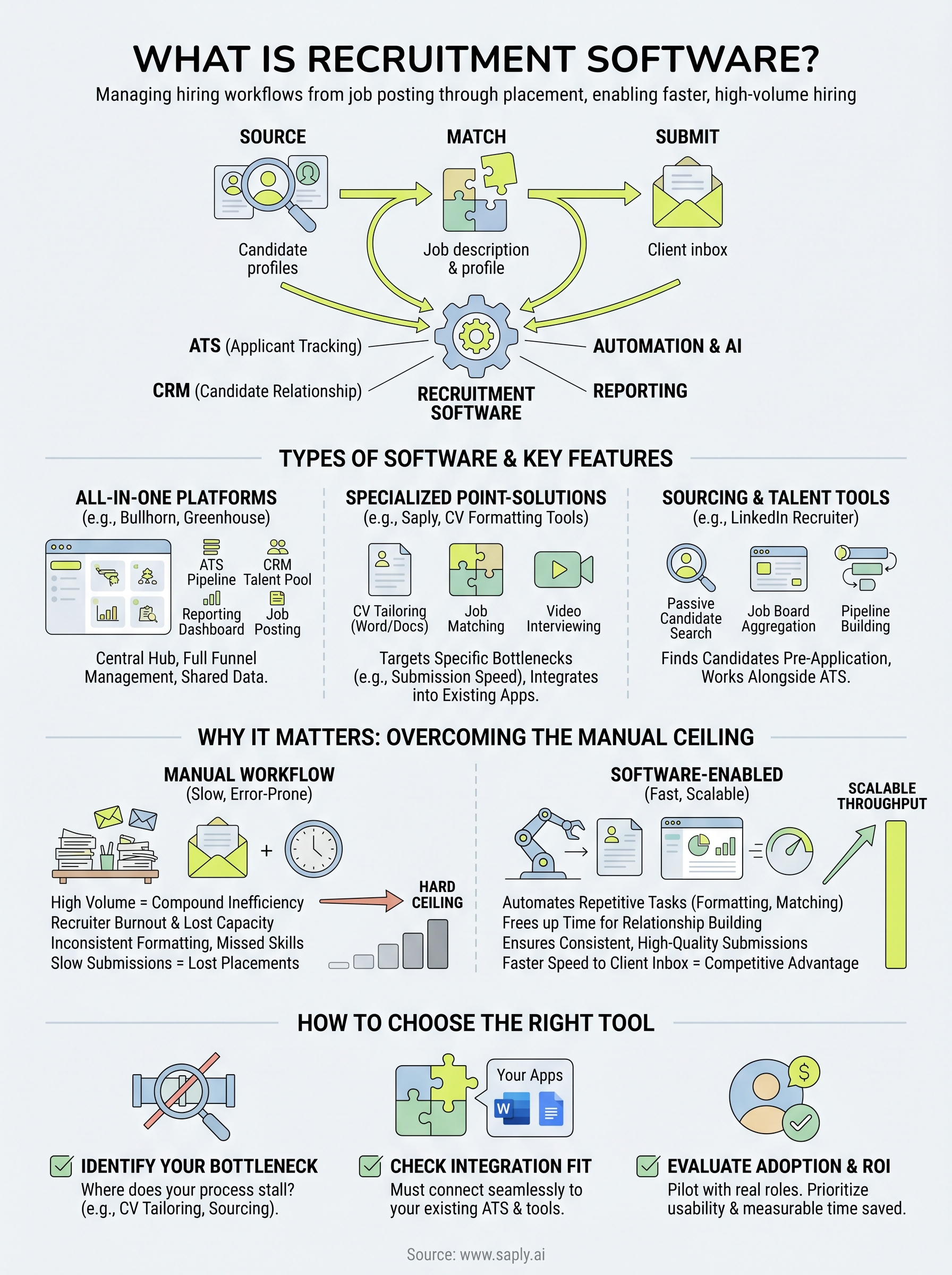
Every staffing agency runs on the same basic loop: source candidates, match them to roles, and submit them before the competition does. The tools that power this loop matter enormously, and that start...
Written by: Saply Team
What Is Recruitment Software? Features, Types, And Top Tools
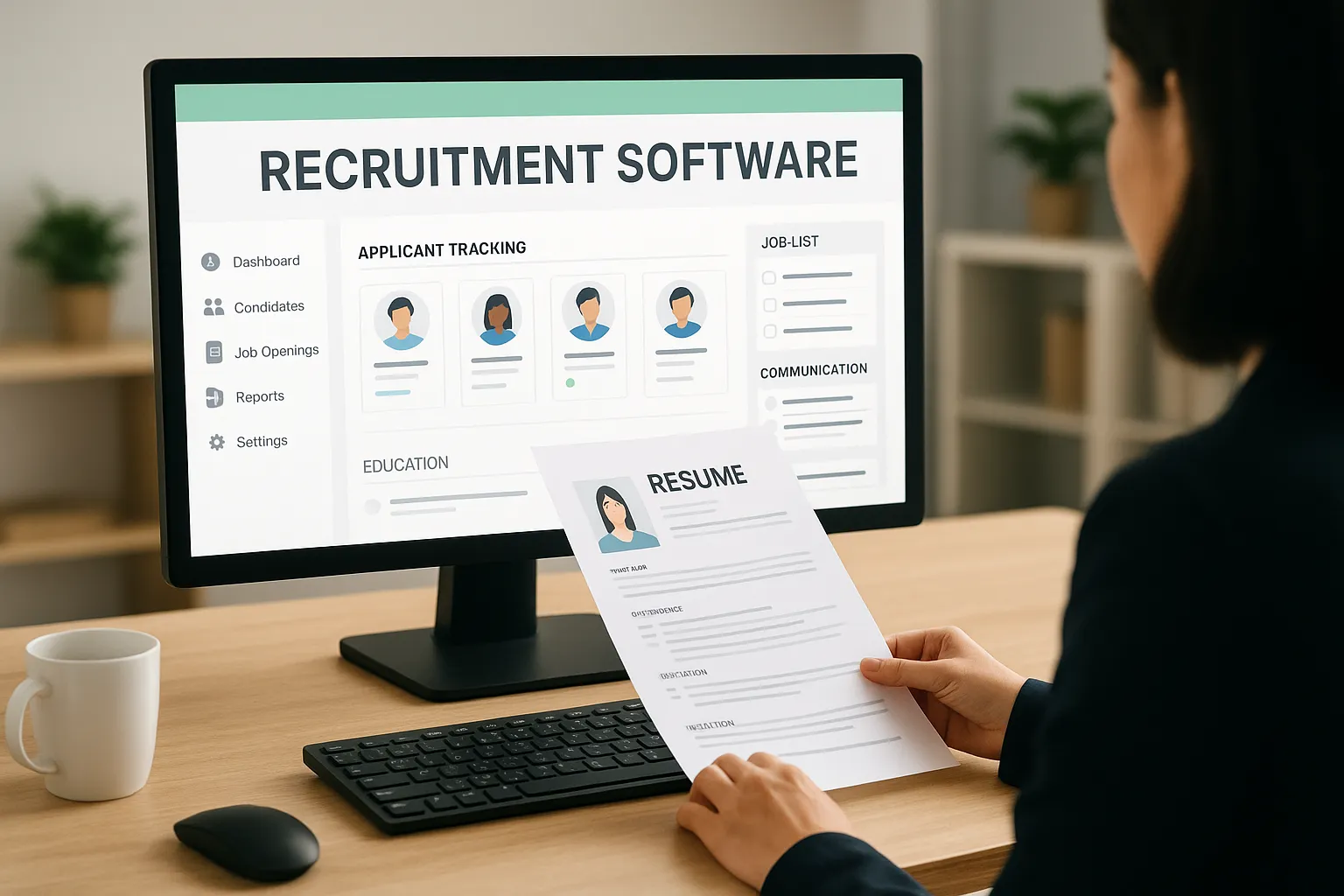
Every staffing agency runs on the same basic loop: source candidates, match them to roles, and submit them before the competition does. The tools that power this loop matter enormously, and that starts with understanding what is recruitment software, the category of platforms built to manage hiring workflows from job posting through placement. Whether you’re a solo recruiter or part of a large consultancy, the right recruitment software directly affects how many roles you fill and how fast you fill them.
At its core, recruitment software handles applicant tracking, candidate communication, resume management, and reporting. But the category has expanded well beyond basic ATS functionality. Modern platforms now include AI-driven features like automated CV tailoring and job matching, capabilities that tools like Saply bring directly into the apps recruiters already use, such as Word, Google Docs, and Outlook. The goal isn’t just to organize your pipeline. It’s to remove the manual work that slows down every submission.
This guide breaks down the key features, types, and top tools in the recruitment software space. You’ll learn what separates a basic applicant tracking system from a full-suite recruitment platform, which features actually move the needle for staffing teams, and how to evaluate solutions based on your agency’s specific workflow. By the end, you’ll have a clear framework for choosing software that fits, not just software that looks good on a features page.
Why recruitment software matters
Staffing agencies live and die by throughput. The recruiter who submits three qualified candidates by noon beats the one who submits five perfect ones by Friday. Understanding what is recruitment software and why it exists starts with recognizing that manual hiring workflows have a hard ceiling, and most agencies hit it faster than they expect. The right software lifts that ceiling by automating repetitive tasks, organizing candidate data, and keeping every submission moving forward without constant human intervention.
The volume problem staffing agencies face
High-volume recruiting creates compounding inefficiencies. When you’re managing 40 open roles and 200 candidates at once, small friction points multiply across every interaction. A recruiter who spends 20 minutes manually formatting a CV for each candidate submission loses more than three hours per day to a single task. Multiply that across a team of five recruiters and you’re looking at over 75 hours of lost capacity every week on formatting alone, before accounting for email follow-ups, interview scheduling, and client reporting.

The data reflects this reality. Research from the Society for Human Resource Management shows the average time-to-fill across industries sits above 40 days. Staffing agencies that reduce internal processing time, even by a few hours per role, consistently see faster placements and stronger client retention. Software that handles the repetitive layer of recruitment frees your team to focus on the work that actually requires human judgment, like building candidate relationships and closing clients.
The agencies that scale successfully aren’t necessarily the ones with the most recruiters. They’re the ones who remove the most friction from each recruiter’s daily workflow.
Speed determines who wins the placement
In competitive staffing markets, submission speed is a real differentiator. Clients award placements to the agency that delivers qualified candidates first, not the one with the most thorough internal process. When two agencies source from similar talent pools, the one using software to automate formatting, tailoring, and submission preparation will consistently reach the client’s inbox first.
This advantage isn’t limited to individual placements. Faster submissions build a reputation for responsiveness that becomes a long-term competitive asset. Clients start routing exclusive roles to the agencies they trust to move quickly. Over time, that trust compounds into a revenue stream that inconsistent manual wins simply can’t match. Speed, at scale, is a strategy.
What manual workflows actually cost your team
Beyond time, manual workflows carry costs that don’t always appear in a budget line. Recruiter burnout is one of the most underreported problems in staffing. When skilled consultants spend half their day on administrative tasks instead of candidate conversations and business development, engagement drops and turnover increases. Replacing a strong recruiter is expensive, and the root cause is often a workflow problem that gets misdiagnosed as a personnel problem.
Manual processes also introduce consistency and error risks that directly affect submission quality. When formatting is handled by hand, templates drift across your team. When tailoring happens without a structured approach, key skills get buried or missed entirely. A genuinely strong candidate can lose a placement opportunity because their CV wasn’t optimized before it reached the client. Recruitment software solves this by applying a consistent, structured process to every submission, regardless of which recruiter handles it. That consistency protects both candidate quality and your agency’s standing with the clients you work hardest to retain.
What recruitment software includes and key features
When people ask what is recruitment software, they often picture a simple applicant tracking database. The reality is more layered. Modern platforms bundle multiple capabilities into a single workflow tool, and understanding what each feature does helps you evaluate whether a platform actually fits your process or just adds complexity to it.
Applicant tracking and pipeline management
At the foundation, every recruitment software includes some form of applicant tracking, which lets you organize candidates by role, stage, and status. You can move candidates through pipeline stages, set reminders, flag top profiles, and assign ownership within your team. Centralized pipeline visibility means no candidate falls through the cracks when a recruiter is out, and your managers get a real-time view of where each role stands without pulling data from spreadsheets.
A structured pipeline also creates consistency across your entire team. When everyone follows the same stage definitions and workflow, identifying bottlenecks takes minutes rather than hours. Most platforms let you customize stages to match your specific process, whether you’re filling permanent roles, contract positions, or a mix of both.
Candidate communication and document handling
Recruitment software handles candidate communication directly within the platform, reducing the back-and-forth between email, your ATS, and document folders. You can send outreach, collect documents, schedule interviews, and log call notes without switching tabs constantly. Document management features let you store, version, and retrieve CVs and cover letters in a structured way, rather than hunting through scattered email threads.
The platforms that save the most time keep all candidate-related activity in one place, so your recruiters never have to reconstruct a conversation history from multiple sources.
Reporting, integrations, and AI-powered features
Reporting tools inside recruitment software track metrics like time-to-fill, submission-to-interview ratios, and placement rates by recruiter or client. These numbers help you identify where your process slows down and which roles consistently generate strong candidates. Integration capabilities determine whether the software connects to your existing ATS, email client, or document tools, which directly affects how much your team actually adopts it day to day.

AI-powered features are now standard in stronger platforms. Automated CV tailoring, job matching, and skill gap analysis shift work that used to take 20 minutes per candidate to a matter of seconds. Tools like Saply go further by embedding these capabilities directly inside Word, Google Docs, and Outlook, so your recruiters get the benefit without changing the tools they already use.
Types of recruitment software and when to use each
Understanding what is recruitment software as a category means recognizing that the label covers several distinct product types, each built for a different layer of the hiring process. Picking the wrong type creates friction instead of removing it, which is why knowing the difference matters before you commit budget or implementation time to any platform.
All-in-one recruitment platforms
All-in-one platforms bundle applicant tracking, candidate communication, reporting, and job posting into a single system. They’re designed for agencies or in-house HR teams that want one central hub for every stage of the hiring workflow. Platforms like Bullhorn and Greenhouse fall into this category, and the appeal is straightforward: less context switching, shared candidate data across your team, and reporting that spans your full funnel from first contact to placement.
The tradeoff is that these systems prioritize breadth over depth. They cover every stage adequately, but they rarely excel at any single one. If your agency’s biggest bottleneck is submission speed or CV quality, a general-purpose platform won’t solve it on its own. You’ll typically need additional tools to handle the specialized work those systems leave behind.
Specialized point-solution tools
Point solutions target one part of the recruitment process and go deep on it. CV formatting and tailoring tools, video interview platforms, and candidate assessment software all fit here. You bring them in to solve a specific bottleneck, not to replace your entire stack. If your recruiters spend hours reformatting and tailoring CVs before each submission, a specialized tool like Saply handles exactly that layer without disrupting the rest of your workflow.
Specialized tools often deliver faster ROI than all-in-one platforms because they target the specific friction point that’s costing your team the most time.
These tools work best when they integrate directly into the apps your team already uses, which keeps adoption high and ramp-up time short. A point solution that requires a separate login rarely gets consistent use, no matter how capable it is.
Sourcing and talent pipeline tools
Sourcing platforms focus on finding candidates before they apply. LinkedIn Recruiter, job board aggregators, and passive candidate tools fit this category. They help you build a pipeline proactively rather than waiting on inbound applications, which matters most when you’re filling competitive or hard-to-source roles.
These tools work alongside your ATS, not instead of it. Once you identify a candidate through a sourcing platform, they move into your main recruitment system for tracking and submissions. Knowing which category to reach for at each stage is what separates a well-designed recruitment stack from a cluttered one.
Recruitment software vs ATS vs recruiting CRM
These three terms get used interchangeably, but they describe different tools with different purposes. Understanding the distinction helps you figure out what you already have, what you’re missing, and whether a new platform will actually close the gap. When people ask what is recruitment software, the honest answer is that it’s an umbrella term covering all three categories, but that umbrella hides real functional differences that matter when you’re building your hiring stack.

What an ATS actually does
An applicant tracking system (ATS) is built to manage active applicants through a defined hiring process. When a candidate applies for an open role, the ATS captures their information, routes them through stages, and tracks where they stand. It’s fundamentally a process management tool, designed to handle compliance, organize inbound applications, and give hiring managers visibility into who’s moving forward and who’s been declined.
Most ATS platforms focus on the post-application phase. They don’t help you source candidates proactively, and they rarely offer tools to optimize CVs or tailor them to specific job descriptions. If your bottleneck is processing applicants efficiently, an ATS solves it. If your bottleneck is finding and preparing strong candidates before they enter the pipeline, you’ll need something else alongside it.
What a recruiting CRM adds
A recruiting CRM shifts the focus from active applicants to long-term candidate relationships. Instead of tracking where someone is in a hiring process, a CRM tracks your history with them, including past conversations, roles they’ve been considered for, and their availability timeline. Staffing agencies use CRMs to build and maintain a talent pool they can draw from quickly when a new role opens, rather than starting a fresh sourcing effort every time a client calls.
The CRM works before the ATS takes over: it’s where you nurture candidates until the right role appears, then hand them off into an active pipeline.
How the three categories relate
Recruitment software, at the broadest level, includes ATS and CRM functionality but also covers everything else in the hiring workflow: job posting, CV formatting, AI-driven matching, reporting, and integrations. Some all-in-one platforms bundle all three categories together. Others leave gaps that specialized tools fill.
A quick reference for how your use case maps to each category:
| Tool | Primary focus | When you need it |
|---|---|---|
| ATS | Active applicant tracking | High inbound application volume |
| Recruiting CRM | Candidate relationship management | Proactive sourcing and talent pools |
| Recruitment software | Full workflow, end to end | Scaling your entire hiring operation |
Knowing which category addresses your specific problem prevents you from buying an ATS when what you actually need is a CRM, and it stops you from investing in a full suite when a point solution targeting one bottleneck would deliver faster results at a lower cost.
How recruitment software works in a hiring workflow
Understanding what is recruitment software at a feature level is useful, but seeing how it fits into your actual day-to-day process makes the value concrete. Recruitment software doesn’t operate as a system you check once a week. It runs alongside every stage of your hiring workflow, from the moment a client sends over a job brief to the moment you confirm a placement. The way each stage connects determines how much time your team saves and how consistently strong your submissions become.
Intake and preparation: from job brief to submission-ready CV
When a new role lands, your recruiter needs to understand exactly what the client wants before matching anyone to it. Recruitment software pulls job requirements directly from your ATS or from a manual entry, making that brief available to every recruiter working the role without re-entering data. Sourcing tools then search your existing talent pool against those requirements, surfacing candidates who fit the core criteria rather than relying on manual database searches.

Getting the intake stage right sets the ceiling for every submission that follows: if the job requirements aren’t captured accurately, no amount of tailoring will compensate for the mismatch.
Once you identify a candidate, the preparation stage is where most manual time disappears in a well-configured recruitment software setup. The platform formats the CV to your agency template and tailors the content to match the specific job description. AI-powered tools analyze the role requirements, highlight relevant experience, and flag skill gaps before the CV reaches the client. Saply handles this step inside Word, Google Docs, and Outlook, so your recruiter never switches tools or manually reformats a document.
Submission, tracking, and reporting: closing the loop
After preparation, the CV moves into your submission workflow, and recruitment software logs every submission against the relevant role and candidate record. Your pipeline view updates in real time, giving managers visibility into submission volume and response rates without chasing individual recruiters for status updates. Here’s what the software captures at this stage:
- Which candidates were submitted to which roles and when
- Client response times and interview conversion rates
- Stage-by-stage bottlenecks across your active pipeline
- Placement outcomes tied back to specific sourcing channels
Reporting built on this data lets you see which roles are stalling, which clients respond fastest, and which recruiters consistently convert submissions into interviews. That visibility directly shapes how you allocate effort the following week, turning your hiring workflow from a reactive process into one you can measure and improve over time.
How to choose recruitment software
Knowing what is recruitment software is only half the work. Choosing the right one for your agency requires a structured evaluation, because the platform that works well for a 10-person in-house HR team will often create friction for a high-volume staffing agency running 50 open roles at once. Your specific workflow bottleneck should drive the decision, not feature counts or vendor rankings.
Start with your actual workflow bottleneck
Before you request a demo or compare pricing tiers, identify the stage in your hiring process that costs the most time or produces the most inconsistency. If your recruiters lose hours to CV formatting and tailoring before each submission, a general-purpose ATS won’t solve it. If sourcing is the constraint, you need a different tool entirely. Write down the three tasks your team repeats most and wastes the most time on. The software you choose should directly address at least two of those tasks, not just promise broad coverage across every stage.
The clearest signal that a platform fits your team is whether it removes the specific friction you named before you started evaluating it.
Check integration fit before anything else
Adoption depends heavily on whether the software works inside the tools your team already uses daily. A platform that requires a separate login or a new document workflow gets abandoned fast, regardless of how capable it is on paper. Check whether the software connects to your existing ATS, email client, and document editors before committing to anything else. Saply, for example, runs directly inside Microsoft Word, Google Docs, and Outlook, which means recruiters never leave the tools they’re already in.
Verify exact integration points rather than taking a sales team’s word for compatibility. Integration documentation is publicly available for major platforms, so confirm that the connection covers your actual data flow. A confirmed integration that works with your real environment saves weeks of implementation trouble later.
Evaluate adoption, not just features
A feature list looks compelling in a demo, but the real measure is whether your recruiters actually use the platform consistently after week two. Adoption rates drop sharply when onboarding takes longer than a few hours, when the interface requires dedicated training to navigate, or when the tool replaces a faster manual habit without enough visible payoff. Ask any vendor for a realistic onboarding timeline and request references from agencies with a similar team size and volume.
Pilot the software with two or three recruiters on live roles before rolling it out to your full team. The feedback they give you after two weeks of real submissions will tell you more than any sales conversation ever will.
Pricing, implementation, and common pitfalls
Once you understand what is recruitment software and which type fits your workflow, the practical side of purchasing and deploying it deserves the same careful attention. Pricing structures vary widely across the category, and what looks like a straightforward monthly subscription often carries setup fees, per-user costs, and integration charges that only surface after you’ve signed a contract. Getting a full cost picture before you commit prevents budget surprises that undermine the ROI you’re expecting.
How recruitment software is typically priced
Most platforms charge on a per-user or per-seat basis, with monthly fees ranging from $50 to $500 per recruiter depending on the platform’s scope and feature depth. Enterprise all-in-one suites often quote annual contracts with minimum seat requirements, which locks you into a cost structure that doesn’t flex well if your team size changes. Specialized point solutions like CV formatting or matching tools frequently use a credit or usage-based model instead, where you pay per document processed rather than per user, which works well for agencies with variable submission volumes.
Always request a full breakdown of implementation fees, onboarding costs, and integration charges before signing anything, because these can double your first-year cost with a vendor who buries them in the contract.
Ask each vendor specifically about data migration costs if you’re moving from an existing ATS or CRM. Transferring candidate records, formatting templates, and historical placement data isn’t always included in the base price, and some platforms charge separately for it.
What implementation actually takes
Implementation timelines range from a few hours for plugin-based tools to several weeks for enterprise platforms that require custom configuration. The difference comes down to how deeply the software integrates with your existing stack and how much historical data you’re bringing over. Saply, for example, deploys directly inside Microsoft Word, Google Docs, and Outlook, which means your team is operational the same day without a dedicated IT project.
Larger platforms typically require an implementation manager, staff training sessions, and a testing phase before going live. Build a realistic go-live date into your planning and factor in a two-week buffer for issues that surface during testing on real workflows.
Common pitfalls to avoid
The most common mistake agencies make is choosing software based on the feature list rather than the workflow fit. A platform packed with capabilities your team won’t use adds complexity without adding value. The second most common mistake is skipping the pilot phase. Running the software on two or three live roles before a full rollout surfaces integration gaps and usability issues that no demo will reveal.
Top recruitment software tools to consider in 2026
Knowing what is recruitment software across its categories makes tool selection considerably more straightforward. The platforms below represent strong options across different use cases in 2026, organized by the workflow layer they target. No single tool fits every agency, so match each option to the specific bottleneck you identified before you started evaluating.
All-in-one platforms for staffing agencies
Bullhorn remains the dominant all-in-one platform for staffing firms, combining applicant tracking, CRM functionality, and client management in a single system. It integrates with a wide range of third-party tools and handles high-volume pipelines across both permanent and contract recruiting. Greenhouse suits agencies supporting structured corporate hiring processes, with strong reporting and configurable workflows that support compliance-heavy environments.
Workday Recruiting fits larger enterprise staffing operations that need deep integration with HR, payroll, and workforce planning systems. It carries a higher implementation cost and a longer ramp-up time, but it delivers unified data across the full employee lifecycle from application through offboarding.
Specialized CV and submission tools
Saply targets the layer that all-in-one platforms consistently underserve: CV formatting and tailoring at the point of submission. It runs directly inside Microsoft Word, Google Docs, and Outlook, so your recruiters never leave the tools they already use to format, tailor, and match a CV to a job description. Saply connects to Bullhorn, Carerix, and Spott, pulling job requirements directly from your ATS and applying AI-driven tailoring and match scoring in real time.
If your biggest time loss happens between sourcing and submission, a specialized tool like Saply will deliver faster ROI than upgrading your ATS.
The platform uses a credit-based billing model with monthly and yearly options and offers a 14-day free trial with no credit card required. Custom CV template integration takes 48 hours, which means your agency’s branded templates are active before your trial period ends.
Sourcing and talent pipeline software
LinkedIn Recruiter gives your team direct access to passive candidates across industries and geographies, with filtering tools that narrow a large talent pool to the profiles most relevant to each open role. It works alongside your ATS rather than replacing it, handling pre-application sourcing before candidates enter your active pipeline.
Combining a sourcing tool, a core ATS, and a specialized submission tool like Saply gives you full coverage across every stage without forcing your entire workflow into a single platform that handles none of them exceptionally well.
Conclusion
What is recruitment software at its core? It’s the infrastructure that determines how fast your agency moves from job brief to qualified submission, and how consistently your team performs that process at scale. The right platform removes the repetitive work that slows your recruiters down, whether that’s formatting CVs, tailoring content to job descriptions, or tracking submissions across 40 open roles simultaneously. Choosing correctly means starting with your actual bottleneck, not the most popular platform or the longest feature list.
Your agency gains the most from software that fits directly into your existing workflow rather than replacing it. If your biggest time loss happens between sourcing a strong candidate and getting their CV in front of a client, a specialized tool solves that faster than any all-in-one platform will. Try Saply free for 14 days and see how much time your team reclaims on every submission.