



13 SEO For Staffing Agencies Tips To Rank And Convert Fast
Most staffing agencies rely on referrals, job boards, and outbound outreach to find candidates and clients. That works, until your competitors start showing up on page one of Google and you don't. SEO...

Most staffing agencies rely on referrals, job boards, and outbound outreach to find candidates and clients. That works, until your competitors start showing up on page one of Google and you don’t. SEO for staffing agencies isn’t optional anymore. It’s how you build a consistent pipeline of inbound leads without paying for every single click.
The challenge? SEO advice out there is generic. It’s written for SaaS companies, e-commerce stores, or local restaurants, not for agencies juggling candidate pipelines, client relationships, and tight submission deadlines. Staffing firms need strategies that account for multi-location targeting, niche job verticals, and the reality that speed is a competitive advantage in recruitment.
At Saply, we build tools that help staffing agencies move faster, from AI-powered CV formatting to job-matched tailoring that cuts submission time dramatically. But getting candidates and clients to your door in the first place? That’s where SEO comes in. Below, you’ll find 13 proven tips designed specifically for staffing and recruitment firms that want to rank higher, attract qualified traffic, and convert visitors into real business.
1. Speed up candidate submissions with Saply
Speed doesn’t directly change your Google rankings, but it changes everything that affects them. When recruiters spend less time reformatting CVs and more time placing candidates, your agency builds a reputation for fast, accurate submissions. That reputation drives repeat client business, more reviews, and more referrals, all of which signal to Google that your site is worth ranking.
What to do
Use Saply to automate CV formatting and job-specific tailoring inside the tools your team already uses. Instead of copy-pasting between Word documents and ATS systems, you apply your agency template and match candidates to job descriptions in one click. The result is a cleaner submission process that frees recruiter time for higher-value work like building client relationships and sourcing harder-to-find candidates.
Why it works for staffing sites
Faster submissions mean more placements per recruiter, which directly funds the rest of your SEO strategy, whether that’s hiring a content writer, building location pages, or fixing technical issues. Beyond the business impact, satisfied clients leave reviews, and positive Google reviews boost your local SEO visibility for searches like “staffing agency [city].” When you’re competing on seo for staffing agencies, your off-site reputation matters as much as what’s on your pages.
The agencies that rank consistently aren’t just optimizing pages. They’re running efficient operations that generate the reviews, links, and repeat traffic that sustain rankings long term.
How to implement in a week
Start your 7-day free trial with Saply and connect it to your existing Microsoft Word, Google Docs, or Outlook setup. Work through this sequence:
- Day 1: Upload your agency CV template for custom integration
- Day 2-3: Have two recruiters run live submissions through the tool and note time saved
- Day 4-5: Roll out to the full team and set a baseline for weekly hours recaptured
- Day 6-7: Use freed-up time to start keyword research or update one high-traffic page
Pitfalls to avoid
Don’t treat Saply as a one-time formatting fix while ignoring the underlying submission workflow. If your intake process for raw candidate CVs is disorganized, automation only speeds up the mess. Clean your candidate data and intake forms before you scale with any tool.
Also, skip the temptation to bypass the custom template setup. Generic formatting undermines the consistent, professional presentation that clients expect and that reinforces your agency’s brand across every submission.
2. Map keywords to clients and candidates
Most staffing agencies optimize for one audience and ignore the other. Strong seo for staffing agencies requires two separate keyword maps: one targeting hiring managers and clients, and another targeting active job seekers. Without this split, your pages try to serve everyone and end up converting no one.

What to do
Build a keyword list that separates client-facing terms (“hire warehouse workers Chicago”) from candidate-facing terms (“warehouse jobs Chicago hiring now”). Use Google Search Console to see which queries already bring traffic, then identify gaps where competitors rank and you don’t.
You can’t write one page that ranks for “staffing agency for finance firms” and “accounting jobs NYC” at the same time. Separate pages, separate intent.
Why it works for staffing sites
Search intent is specific. A hiring manager looking for a staffing partner and a job seeker hunting for their next role type different things into Google. When your pages match the exact intent behind each query, your click-through rate and time-on-page improve, both of which signal to Google that your content is worth ranking higher.
How to implement in a week
- List your top five client industries and map one primary keyword to each
- List your top five candidate job types and do the same
- Cross-reference both lists against Google Search Console data to prioritize quick wins
Pitfalls to avoid
Don’t target broad, high-volume terms like “staffing agency” without a geographic or niche modifier. You won’t rank for them, and the traffic wouldn’t convert even if you did. Keep every keyword tied to a specific service, location, or role type.
3. Build niche service pages that match intent
A single “Services” page won’t rank for anything specific. Niche service pages give Google a clear signal about what you do and who you do it for, whether that’s healthcare staffing, IT contract placements, or light industrial recruitment. Each page should target one vertical and one audience type.
What to do
Create a dedicated page for each industry vertical or staffing specialty your agency serves. Each page needs its own unique headline, body copy, and call to action tied directly to that niche.
Don’t copy the same page structure and swap out a single word. Search engines detect duplicate patterns, and so do the clients you’re trying to convert.
Why it works for staffing sites
This approach is one of the most reliable moves in seo for staffing agencies because it matches search intent at a granular level. A hiring manager searching “logistics staffing agency Dallas” won’t click a generic services page.
Niche pages outperform general pages because they match exactly what the searcher typed, which lifts click-through rate and on-page engagement at the same time.
How to implement in a week
- Audit your current services page and list every distinct vertical your team places in
- Write one new page per vertical, keeping each tightly focused on a single industry and role type
- Add client-facing proof like placement stats or sector-specific case studies to each page
Pitfalls to avoid
Don’t create thin pages with fewer than 400 words just to check a box. Google treats low-quality niche pages as a site-wide trust signal, and thin content hurts rankings across your entire domain.
Each page needs to genuinely answer the questions a specific client or candidate would bring to it, not just repeat your agency name next to an industry term.
4. Create location pages that actually rank
Location pages are one of the fastest wins in seo for staffing agencies because they target high-intent searches tied to specific markets. A hiring manager in Phoenix isn’t searching for a generic staffing agency. They’re searching for “staffing agency Phoenix” or “temp workers Scottsdale,” and if you don’t have a page built for that query, you won’t show up.

What to do
Build a dedicated page for each city or metro your agency actively serves. Each page needs original copy that speaks to the local job market, specific industries your team places in that region, and a clear call to action. Avoid copy-pasting the same page across locations and swapping city names. Duplicate location pages get filtered out of Google’s index and won’t rank.
Why it works for staffing sites
Local searches convert at higher rates because the searcher has clear geographic intent, which means they’re closer to making a hiring or placement decision. Google rewards pages that genuinely reflect local relevance with stronger rankings in both organic results and the local pack.
Location pages don’t just rank, they attract the exact clients and candidates who are ready to act in your specific market.
How to implement in a week
- List every active market where your team places candidates regularly
- Write one page per location with at least 400 words of market-specific content
- Include local industry data, nearby office details, and any region-specific case studies
Pitfalls to avoid
Don’t create location pages for cities where your agency has no real presence. Google’s systems and actual visitors both notice when local signals are thin or fabricated, which damages your credibility across the entire site.
5. Publish job posts on your site, not only boards
Job boards like Indeed and LinkedIn capture most of the search traffic for active job seekers, and if you only post there, you’re building someone else’s SEO. Publishing job listings directly on your own site drives organic search traffic to a domain you control, builds indexable content that compounds over time, and creates a direct conversion path straight to your team.
What to do
Post every active role as a dedicated page on your own site before syndicating it to external boards. Each listing needs a unique URL, a descriptive title that mirrors how candidates actually search, and a full job description. Don’t paste a two-line summary. Thin job posts rank poorly and fail to convert the candidates who do land on them.
Why it works for staffing sites
This is one of the most underused moves in seo for staffing agencies. Every job post is a keyword-rich, indexable page that targets specific role titles, locations, and industries. Over time, a library of well-written job pages builds real topical authority and brings in candidate traffic that costs you nothing per click.
Your site should be the first place candidates find your jobs, not the last.
How to implement in a week
- Create a standard job post template with fields for title, location, role type, and full description
- Publish at least five active roles as standalone pages this week
- Link each listing back to the relevant niche service or location page
Pitfalls to avoid
Don’t copy job descriptions word-for-word from client briefs without editing them. Identical content that exists elsewhere, whether on another page of your site or on a client’s website, signals duplicate content to Google and suppresses rankings across your entire domain.
6. Add JobPosting schema to every listing
Once your job pages are live, structured data helps Google understand exactly what they contain. JobPosting schema is a block of code you add to each listing that tells search engines the role title, location, salary range, and application deadline in a standardized format. Without it, Google has to guess, and guessing means fewer rich results in search.
What to do
Add JobPosting schema markup to every job listing page on your site. The markup should include the job title, hiring organization, job location, date posted, and salary when available. Incomplete schema still helps, but fully populated schema earns the richest search result appearance, including salary estimates and application deadlines displayed directly in Google Search.
Why it works for staffing sites
Rich results generated by structured data stand out visually in search listings, which drives higher click-through rates without needing a higher ranking position. This is one of the most overlooked moves in seo for staffing agencies because it delivers measurable impact with relatively low effort.
A job listing with rich results showing salary and location gets more clicks than a plain blue link, even when both sit at the same position on the page.
How to implement in a week
- Generate your schema using Google’s Structured Data Markup Helper
- Add the JSON-LD block to the
<head>of each job page - Validate every listing with Google’s Rich Results Test
Pitfalls to avoid
Don’t add schema to a page and forget it. When a role fills, update or remove the schema immediately. Google penalizes sites that show active job schema on listings that are already closed, which damages your credibility across all structured data on your domain.
7. Improve site speed and mobile experience
A slow, hard-to-navigate site loses candidates and clients before they read a single line of your content. Site speed and mobile usability are confirmed ranking factors in Google’s Core Web Vitals, which means they directly affect where your pages show up in search results.
What to do
Run your site through Google PageSpeed Insights and check your Core Web Vitals scores for both mobile and desktop. Pay close attention to Largest Contentful Paint, which measures how fast your main content loads, and Cumulative Layout Shift, which measures visual stability. Both affect user experience and rankings simultaneously.
Why it works for staffing sites
Candidates and hiring managers searching for staffing services are often on mobile devices. If your pages load slowly or shift around while scrolling, visitors leave before converting. In seo for staffing agencies, a poor mobile experience means you’re paying the SEO penalty twice: once in rankings and once in lost conversions.
Speed isn’t a technical nice-to-have. It’s a conversion lever that affects every page on your site.
How to implement in a week
- Compress all images using a tool like Google Squoosh
- Enable browser caching and lazy loading for images below the fold
- Switch to a mobile-responsive theme if your current design breaks on smaller screens
- Eliminate render-blocking JavaScript in your page headers
Pitfalls to avoid
Don’t fix speed issues only on your homepage and ignore the rest of your site. Job listing pages and location pages carry the most candidate traffic, and they’re often the slowest due to embedded maps, large images, and unoptimized job description formatting.
8. Fix duplicate content and thin job pages
Duplicate and thin content quietly drag down your entire domain. When Google finds multiple pages with identical or near-identical text, it struggles to decide which one deserves to rank, so it often ranks none of them. For staffing agencies that post dozens of similar job listings or reuse the same service page copy across locations, this is a real and measurable problem.
What to do
Audit your site for pages with fewer than 300 words and for job listings that share large blocks of identical text. Use Google Search Console to identify pages that receive zero impressions over a 90-day window. Those are your first targets. Either expand the content significantly or consolidate it into a stronger page using a canonical tag.
Why it works for staffing sites
Thin pages dilute the overall quality signal your site sends to Google. One of the most consistent patterns in seo for staffing agencies is that agencies with lean, well-written page libraries consistently outrank agencies with bloated, repetitive ones.
Quality beats quantity every time. Ten strong, unique pages outperform fifty weak, similar ones.
How to implement in a week
- Pull a full page list from Google Search Console or your CMS and flag pages under 300 words
- Identify any job posts that share more than 60% of their text with another listing
- Expand or consolidate flagged pages before publishing new content
Pitfalls to avoid
Don’t delete thin pages without redirecting them. Removing URLs without a proper 301 redirect breaks internal links and destroys any authority that page had already accumulated. Fix the content first, then consolidate if the page genuinely adds no unique value.
9. Handle expired roles without killing SEO
Expired job pages are a silent rankings problem for most staffing agencies. When a role fills and you delete the page, you lose the indexing history and any backlinks that page had built up. When you leave it live with no changes, candidates land on a dead listing and leave immediately, which signals to Google that your site delivers a poor user experience.
What to do
Keep expired role pages live but update them rather than deleting them. Replace the active listing with a “this role has been filled” notice, then link visitors to similar open positions or your general jobs page. This preserves the page’s authority while redirecting candidate intent toward an active conversion path.
Why it works for staffing sites
This approach is one of the more overlooked wins in seo for staffing agencies. Every expired page that you maintain correctly keeps its ranking potential intact while reducing bounce rate, because visitors land somewhere useful rather than a 404 error.
Dead-end pages waste the authority your site already built. Redirect that value toward something that converts.
How to implement in a week
- Audit your site for job pages with no active listing using your CMS or Google Search Console
- Add a filled-role notice with links to three related open positions on each expired page
- Set a recurring calendar reminder to review and update expired listings every two weeks
Pitfalls to avoid
Don’t redirect every expired role to your homepage using a blanket 301. Bulk redirects to unrelated pages send Google a confusing signal and dilute the topical relevance your individual job pages worked to establish. Keep redirects pointed at closely matched, active listings wherever possible.
10. Build internal links that guide conversions
Internal linking is the connective tissue that holds your site together. Without it, strong pages sit in isolation and visitors who land on a job listing have no clear path to your service pages, contact form, or location pages. Every link you place between related pages passes authority and guides both Google and your visitors toward the content that converts.

What to do
Audit your current pages and map out which ones should connect to each other. Niche service pages should link to relevant location pages, job listings should link back to the relevant service page, and every high-traffic page should carry a clear internal link toward a conversion point like a contact form or consultation request.
Why it works for staffing sites
Strong internal linking is one of the most cost-effective moves in seo for staffing agencies because it uses authority you’ve already built. When Google crawls your site, it follows internal links to understand which pages matter most. Pages that receive more internal links get treated as higher-priority content and rank more consistently across competitive queries.
Guide visitors with intent, not guesswork. Every internal link should move someone closer to a decision.
How to implement in a week
- Review your five highest-traffic pages and add at least two internal links on each
- Link every job listing to its matching location or service page
- Add a contextual link from your homepage to your top-performing niche page
Pitfalls to avoid
Don’t stuff links into content where they don’t belong. Forced or irrelevant internal links confuse visitors and dilute the topical signals that help Google understand your site structure. Each link should feel like a natural next step for the reader.
11. Win local SEO with GBP and citations
Your Google Business Profile (GBP) and local citation consistency directly influence how often your agency appears in the local pack for searches like “staffing agency near me” or “temp agency [city].” These two elements work together to tell Google that your business is real, active, and located where you say it is.
What to do
Claim and fully complete your Google Business Profile if you haven’t already. Fill in every field: business name, address, phone number, hours, service categories, and a description that includes your key specialties. Beyond GBP, build citations by listing your agency on major business directories like Yelp, Bing Places, and industry-specific directories so your name, address, and phone number (NAP) appear consistently across the web.
Why it works for staffing sites
Inconsistent NAP data confuses Google’s local ranking systems and signals that your business information may not be reliable. In seo for staffing agencies, local signals carry serious weight because most clients and candidates prefer to work with agencies that have a physical presence in their market.
A complete, consistent GBP with regular activity outperforms a neglected one in the local pack every single time.
How to implement in a week
- Log into Google Business Profile and complete every empty field
- Audit your existing citations using a search for your agency name and phone number
- Correct any NAP discrepancies across all directories you find
Pitfalls to avoid
Don’t use different phone numbers or address formats across directories. Even minor inconsistencies like “St.” versus “Street” weaken your local authority and can suppress your local pack rankings.
12. Earn links, track results, and refresh content
Authority links and consistent performance tracking are what separate staffing agencies that rank once from those that rank reliably over time. Earning backlinks from industry associations, local business groups, and media coverage tells Google that your site is trusted by other credible sources. Combining that with regular content refreshes and rank tracking closes the loop on your entire seo for staffing agencies effort.
What to do
Pursue links by partnering with local chambers of commerce, industry trade groups, and workforce development organizations that list member agencies on their sites. Pitch bylined articles to HR publications or local business journals covering hiring trends in your market. Simultaneously, set up Google Search Console and Google Analytics to track which pages drive the most impressions, clicks, and conversions each month.
Why it works for staffing sites
Links from authoritative, relevant sites pass ranking authority directly to your domain and signal to Google that your agency is a recognized player in your industry. Tracking performance data tells you where that authority is landing and which pages need attention before they slip.
The agencies that sustain top rankings don’t just build links once. They monitor results and update content before it gets stale.
How to implement in a week
- Identify three local or industry organizations your agency could partner with for a listing or feature
- Connect Google Search Console to your site and review your top 10 pages by impressions
- Flag any page where rankings have dropped over the past 90 days for a content refresh
Pitfalls to avoid
Don’t pursue low-quality directory links just to increase your backlink count. Google’s systems identify and discount link schemes, and a pattern of spammy links can trigger a manual penalty that undoes months of legitimate work.
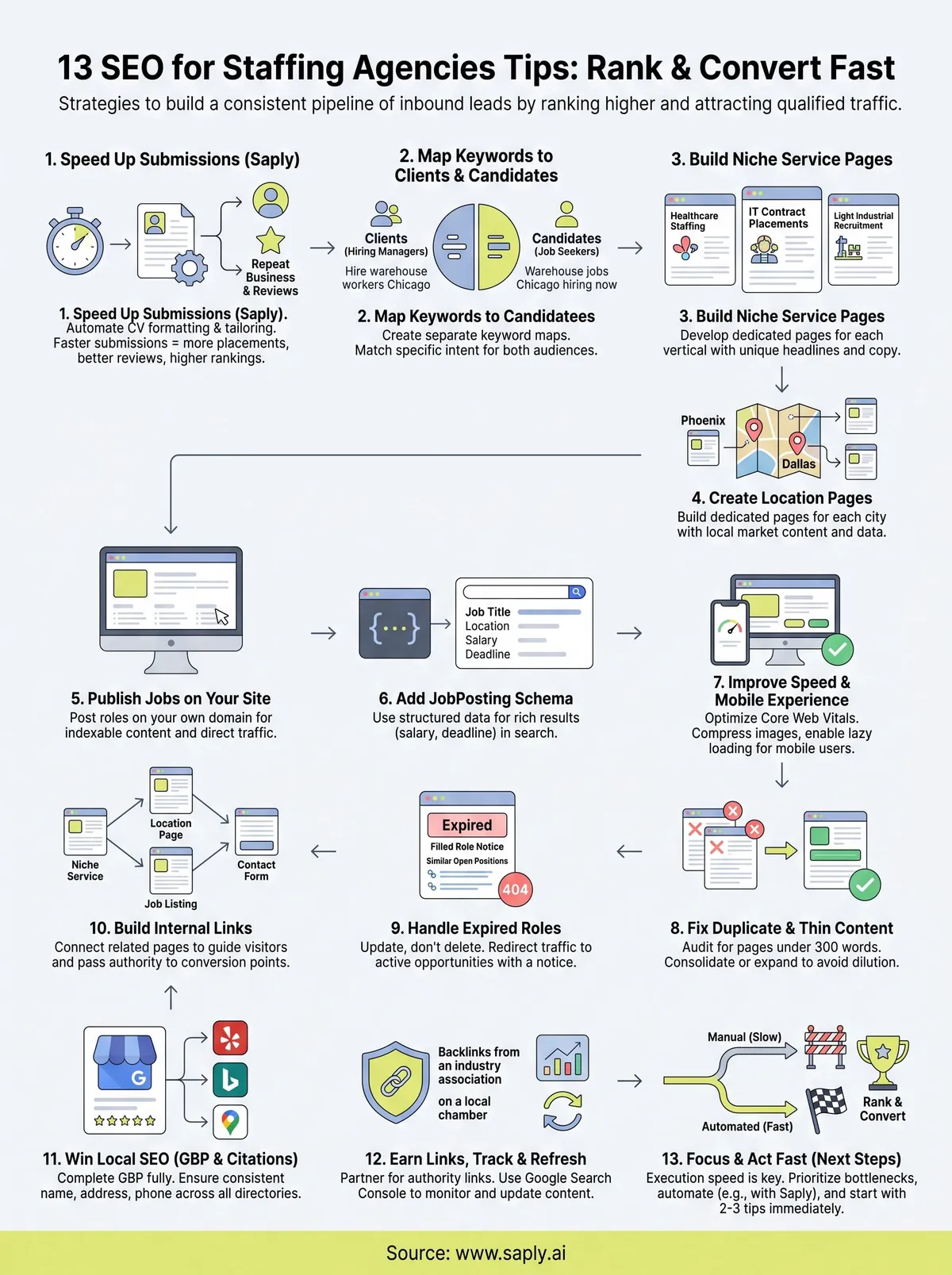
Next Steps
You now have a complete playbook for seo for staffing agencies that covers everything from technical fixes to content strategy to local authority building. The gap between agencies that rank consistently and those that don’t usually comes down to execution speed, not knowledge. Pick two or three tips from this list and act on them this week rather than bookmarking the article and moving on.
Start with what slows your team down most. If manual CV formatting eats hours every week, that time directly reduces your capacity to work on the strategies covered here. Faster submissions mean more placements, more client reviews, and more budget to invest in content and links.
If you want to reclaim recruiter time immediately, start your free trial with Saply and see how much faster your team can move when formatting and tailoring happen in one click. Then use that time to build the rankings your agency deserves.